Help, I cannot connect to FTP

Being able to access your hosting account over FTP is very important to manage your website files. However, there are reason why you may have trouble connecting to the FTP service. This article explains a few things you can try to fix your FTP connection.

Login to your control panel

After your account has been created, or reactivated after a suspension, you may need to login to the hosting control panel once to enable FTP access to your account.

You can login to the control panel by logging in to the client area, go to the Accounts list and click Manage next to the account. Then, click the big green button which says Control Panel to login.

After this, you can try to reconnect to FTP.

Make sure you’re using the correct credentials

Double check that you are using the correct credentials for your FTP account.

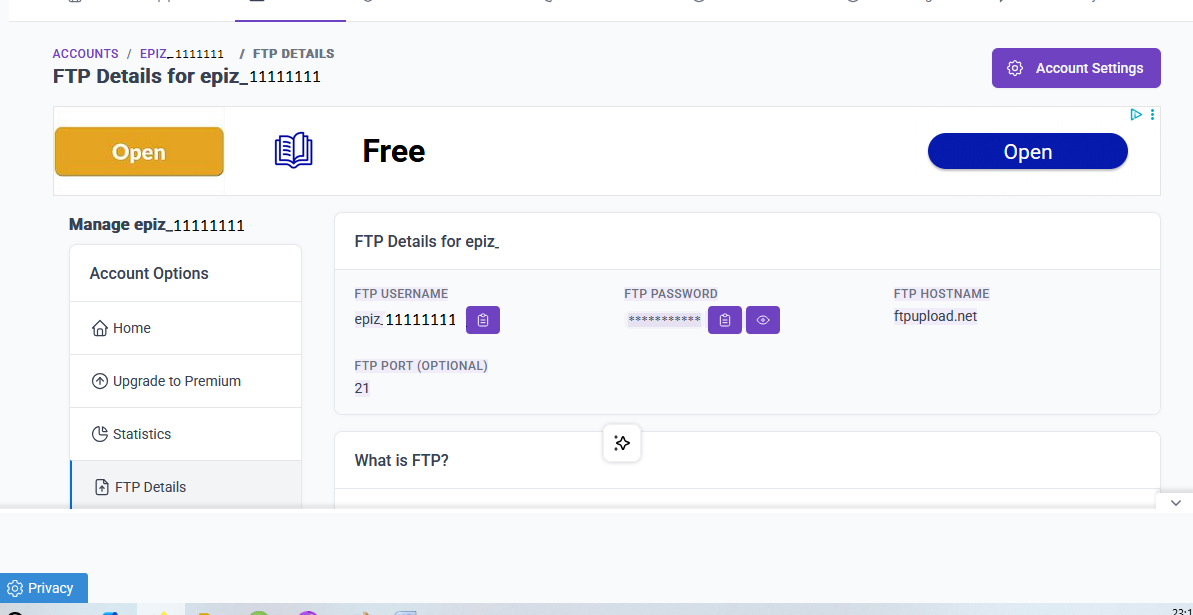
You can view the credentials to use in the client area. Go to the Accounts list and click Manage next to the account. You’ll see a table with the title “FTP Details” which contains the FTP hostname, username and password.

Please note that your FTP password is NOT equal to your client area password. By default, the FTP password is randomly generated.

Change your account password

Sometimes, the hosting account password is not properly synchronized across all services. To fix this, you can change the password of your hosting account, which should force the new password to be set correctly everywhere.

To change your hosting account password, login to the client area, go to the Accounts list and click Manage next to the account. Then, click the Edit Account button and scroll down to the Hosting Account Password panel, and update your password there.

After setting the new password, login to the control panel once to ensure FTP access is enabled. After that, you can attempt to reconnect to FTP with the new password.

Check your router for FTP ALG settings

Some routers, modems or other network gateways apply a so-called Application Layer Gateway (ALG) to certain connections. An ALG intercepts regular connections from your devices to certain services on the internet, and proxies or manipulates them. In some cases, the router also has an ALG for FTP traffic. An ALG can be problematic for two reasons.

If the ALG is enabled, then the router intercepts your FTP connection and may manipulate it. This may cause unexpected issues with the FTP connection and transfers. If the FTP ALG is enabled on your router, disable it and try again.

If the ALG is not enabled, then the router might be blocking FTP connections entirely, or be configured in some other way that prevents FTP connections from being set up correctly. If your router has an FTP ALG option and it’s disabled, enable it and try again.

Check you are connecting to the right IP address

BT Internet and Plusnet in the United Kingdom (but other providers in other countries may have similar restrictions) have a Parental Control feature which is known to interfere with the connection to our FTP servers. Specifically, they block DNS queries to the FTP server name ftpupload.net.

You can check whether this is the case by checking the logs of your FTP client. If you are using FileZilla, and everything is working as it should, you should see a line like this in the logs.

Connecting to 185.27.134.11:21...

If the line shows a different IP address, it means that DNS lookups to the ftpupload.net hostname are being intercepted on your network and blocking you from accessing the FTP server.

You can work around this by using the FTP hostname ftp.epizy.com or using the IP address 185.27.134.11.

Disabling the Parental Controls on the connection should also allow you to connect to the FTP server without issues.

Try to connect with a VPN

Sometimes, network administrators or internet providers restrict or outright block FTP connections from their network. To work around this, you can use a VPN service to bypass the network restrictions of your provider.

If none of this works

If none of the tips given here work, please don’t hesitate to ask for help on our forums.

If you’re using FileZilla, be sure to add full debug logs from FileZilla to help diagnose the issue.

3 Likes
Error when trying to connect to FTP
Filezilla does not connect
Cannot log in to FTP
FTP not working in Total Commander
How can I fixed it?
FTP: 530 Login authentication failed
File transfers unsuccessful via FTP
Error in File Manager Upload Process
Failed to retrieve directory listing
Ftp authentication error
Probleme when trying to connect to FTP with FileZilla
FTP authentication failed
FTP Connection Error
HTML elements not working
FTP not work
Can't login into Filezilla
How to fix "Connection attempt failed with "EAI_NONAME"
Remote Site folder not appearing in FileZilla to transfer ClassicPress CMS files
FTP Connection
Ftpupload.net not work
Password not accepted
Cannot reach website
Unable to connect to server
Can not connect FTP
Hits Limit Suspension
Can't connect to server
Cannot connect to FTP
Hello! Ftp doesn't work for me, it says "wrong login or password", although everything is correct.
Unable to access ftp
I can't log in to FTP for all of my accounts
FTP Login Issues
Issues Connecting to FTP Server
Website doesn't work, FTP (Filezilla) doesn't work either
403 access denied
Problemas con FTP
IP banned when use FTP
Impossible to connect
FTP too many failed file transfer
FileZilla problem
FTP Connection Issue: ETIMEDOUT - Connection attempt timed out
Could not launch Site.Pro An unknown error occurred while connecting to your account! Please try aga
Problem connecting to FTP
Error connecting FileZilla with FTP account
FTP Error
Problem in connecting to ftp server
Cannot Connect to FTP Server
Can't Connect To Filezilla
My ftp still not working after suspension is fixed
FTP Conection Error GNU TLS 110
Can u help me fix this problem?
Error when trying to connect to FTP
WP plugin all-in-one-wp-migration/ stops at 6 percent
Not able to connect to the website through FTP
Ftp.epizy.com is not inaccessible or Down
Provlem connecting via FTP
Upload failed
FTP not working
FTP outage report
FTP connection problem
Asks me for ftp access when updating / installing wp plugins
Error while connecting cyberduck to my website
Connection attempt failed with EAI_NONAME
Unable to Login through Filezilla
FTP has stopped working
Ssl remove
I can't login to my files manager
I cannot login to ftp
File Manager and FTP not working
Ftp problem
Ftp connection with dreamweaver
FTP Login Issues
FileTransfer is opening, auth failed
We couldn't find that page
FTP Connection timed out after 20 seconds of inactivity
Cant update files on website using monsta/fileZilla
Cant download htdocs folder
Problems with FTP using Filezilla
File manager login error
Not Yet Fully Propagated After 4 Days or 96 hours
Cannot login via ftp X multiple clients
FTP not connecting
Suspended
FTP Issues
Error in ftp connection and error to dowloads in file manager
Insecure ftp
FTP NOT working
How to login ftp
FTP failing
Softaculous: "Something went wrong, please allow 20 minutes then retry" on website IP 185.27.134.106
Can't connect to FTP and MYSQL even if website is ready
Can't log in to Monsta FTP/File Manager?
FTP Issue
FTP Issue
FTP Not Connecting
Unable to login to your FTP account. Please ensure the password in the client area is the correct pa
Plz help solve this issie
FTP file transfer
Cant log into filemanager or control panel
Domain redirects
I can't acces to my ftp files
The web page doesn't even exist in google
Site.pro "publish" can't connect to hosting server
Mysql too many redirects
I need help signing to my FTP account
FTP Authentication Failed
Webspace to transfer to infinity
MS FrontPage FTP Address
Can't connect ftp
Unable to connect to FTP
File upload Errors
530 Login Authentication Failed - error happens in FileZilla after changing password
When trying to renewing SSL certificate
FTP not connecting
I cannot be able to upload 50MB software to server via FileZilla
FTP Server don't work
Cannot access website due to plug-in and SSL issues
FTP Issue
Upload Error 413 / Request Entity Too Large
Unable to Access FTP
Conversation about the current outage - Aug. 16-19/23
Too many incorrect login attempts. Please try again in 5 minutes.
Can't access site cause ftpupload.net is down?
Cant connect to fpt and external mysql
Broken FTP Access
530 error when connecting
Your FTP account quota has been exceeded
FTP Data Handshake failed
Issue with FTP over TLS Connection
Error url
I cant login to my FTP
FTP connection
No css at all at website/dashboard
Upload issue
Cannot upload files with file manager
File Transfer Upload Error
Unable to connect FTP, it response a error
Help, I cannot connect to FTP
FTP doesn't work (timeout)
530 Login authentication failed when using lftp to upload static website
Unable to connect FTP via Filezilla
File Manager not showing files
Cannot access my site via FTP
Cannot connect to ftp
Could not access website Files
Sitepro Error
I can't connect via FTP
Can not connect to FTP
FTP Connection fail
The Web Page Cant Opened
How to upload backup.tar file to Wordpress?
Volume unknown/home dir unknown
FTP connection not possible
Filezilla not working
My domain is not working
Png files failed to upload using ftp
I am unable to connect to FTP server using MobaXterm because it keeps asking for a pass
Can't connect FTP with Filezilla
How to I upload php laravel?
Ftp down
FTP Issue
Error in File Manager Upload Process

It took me this long to notice, but should that read

“there are reasons why you may have…”?

:slight_smile:

4 Likes

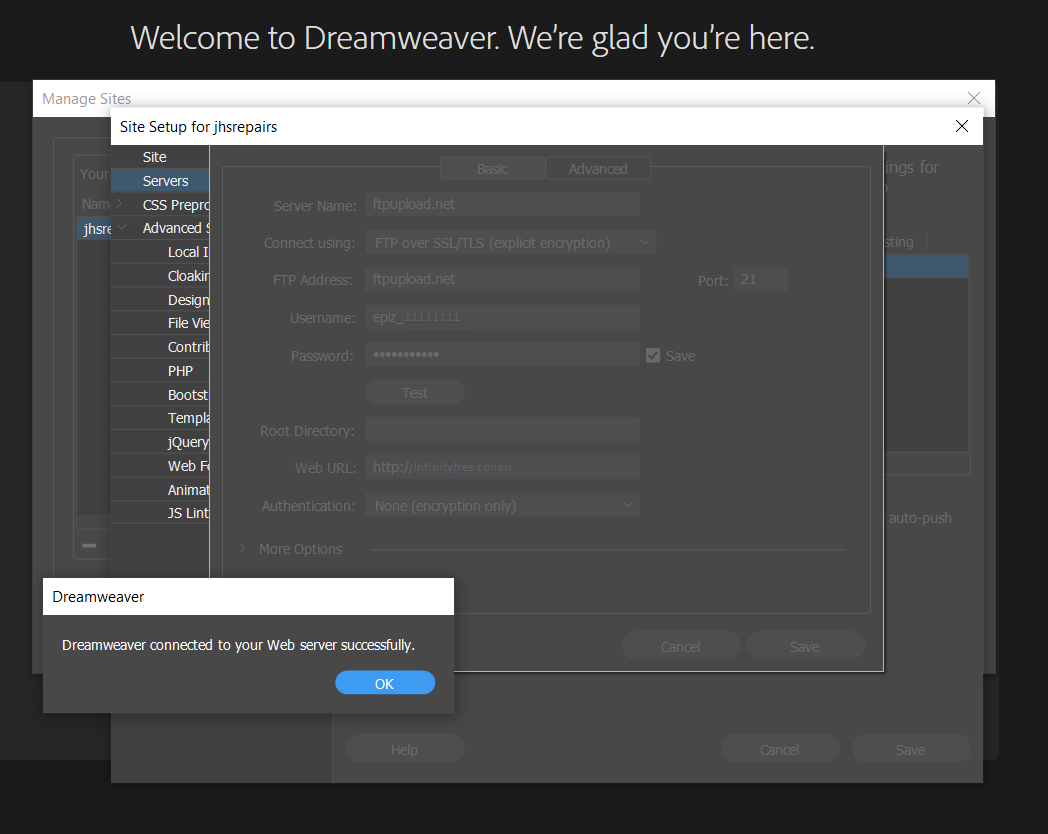
For third party software much of what Admin says above stands true, I have used Dreamweaver below as an example:

@ Admin, I personally would like to see a copy next to FTPHostname, but I do just copy and paste so no mistakes made:

You may have to zoom in to see, but it’s all there