How to point your domain name to InfinityFree nameservers

Before adding your domain name to your hosting account, you need to point it to the InfinityFree nameservers. This guide will walk you through the necessary steps using Spaceship as an example. Keep in mind that different domain registrars have different interfaces, so the exact steps may vary.

Step 0: Find the correct nameservers

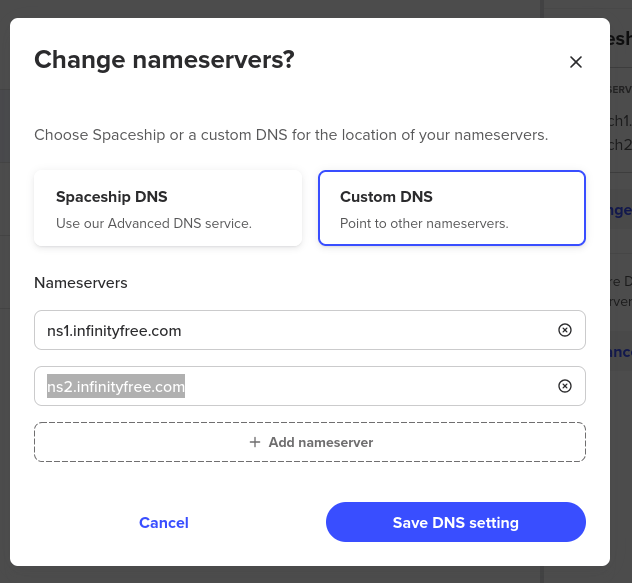
Before changing your nameservers, you need to determine which nameservers to use. The appropriate nameservers depend on your account type:

  • For new accounts or existing accounts with usernames starting with if0_:
    • ns1.infinityfree.com
    • ns2.infinityfree.com
  • For existing accounts with usernames starting with epiz_:
    • ns1.epizy.com
    • ns2.epizy.com
  • Alternative nameservers (suitable for any account):
    • ns1.byet.org
    • ns2.byet.org
    • ns3.byet.org
    • ns4.byet.org
    • ns5.byet.org

These nameservers are primarily used for initial domain verification. After adding the domain to your account, you can use any nameservers you prefer.

Step 1: Access your Domain’s Management Area

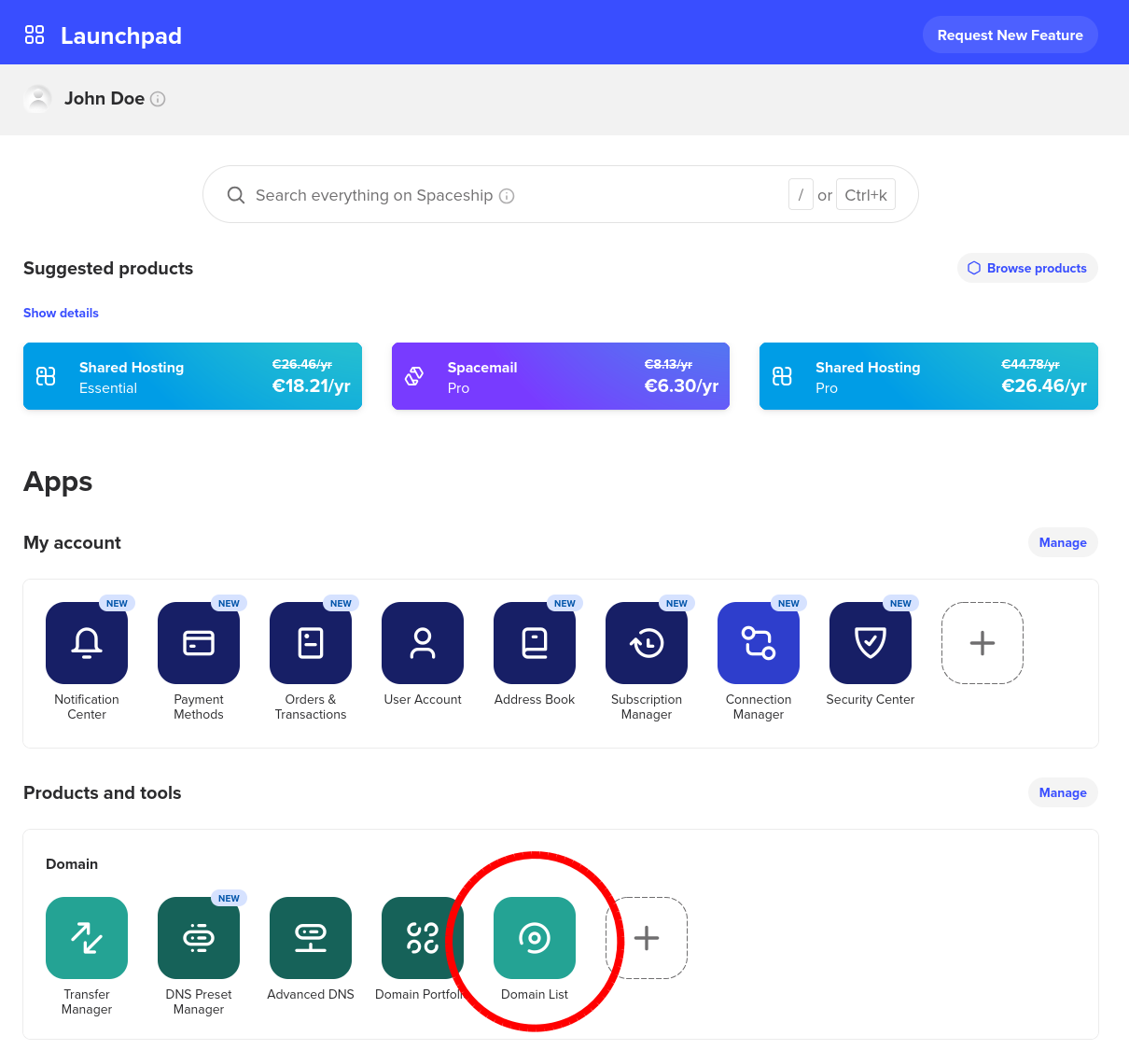
To change your nameservers, log in to your domain registrar’s client area. Navigate to the Domain List:
Step 2: Go to the (Custom) Nameservers setting

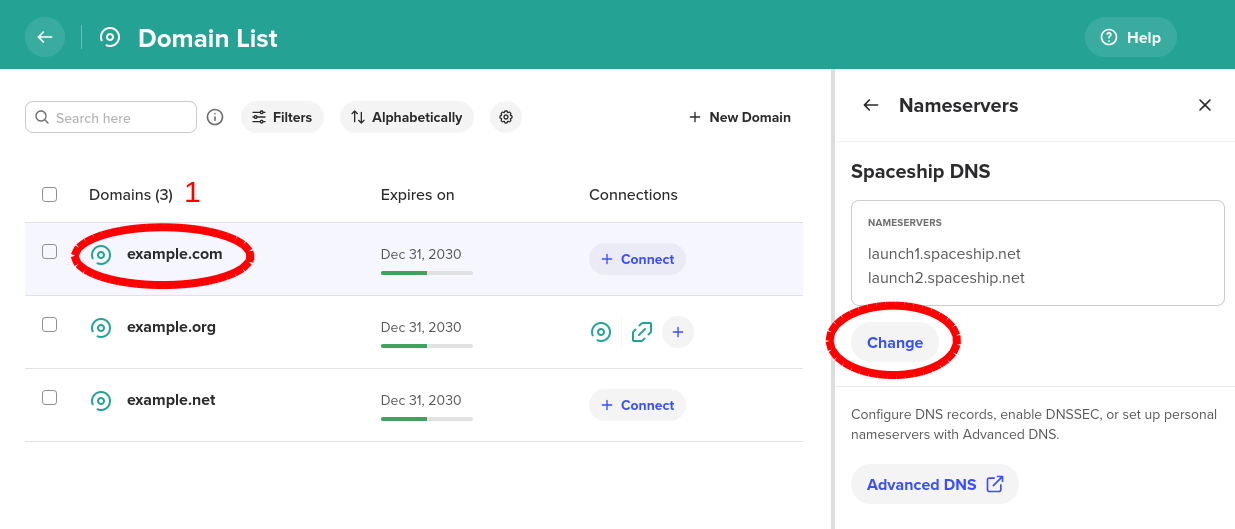
Changing the nameservers of your domain is done through a dedicated setting in your domain registrar’s panel. This is different from the DNS Records section of your domain. With Spaceship, the process looks like this:

  1. In the Domain List, find your domain name and click on it.
  2. In the sidebar menu, click on Nameservers.
  3. Underneath the nameservers section, click Change.
Step 3: Set the custom nameservers

To set the custom nameservers, follow these general steps:

  1. Select the option to use Custom Nameservers.
  2. Remove any nameservers that are currently configured.
  3. Add the nameservers you identified in Step 0.
  4. Save the custom nameservers.

Step 4: Wait for the changes to propagate

After saving the custom nameservers, the changes need time to propagate across the internet. This process can take anywhere from a few hours to a few days. Once propagation is complete, your domain will be pointed to the InfinityFree nameservers, and you can proceed with adding your domain to your hosting account.

That’s it! You have successfully pointed your domain to the InfinityFree nameservers.

10 Likes
DNS records
How to add your own domain to your account
Trouble adding custom domain
How long can I use my free account?
Add domain custom
Nameservers + Cloudflare
Your domain is not yet pointing to ns1.epizy.com and ns2.epizy.com
IP address for ns1.epizy.com to Host my Subdomain Name on your Web Hosting from current host
Problems with my domain
Example.ml
I need my dns records of infinityfree host
WordPress
Change nameserver
Website site can’t be reached
Website Server-iP not found
Help
Can't ping IP of my website xxxx.infinityfreeapp.com
Can't pard new domain
Google domain
Not showing domain in my domain name checker
How to create a account using my domain name?not subdomain
How to add your domain with CNAME verification
When I open my domain name it gives me an error page
Hosting
New site not appearing
My website image url not able to show preview/thumbnail to reddit post
Website showing up blank
How to remove ifast net from my web, ( ads )
Add a domain name but don't use nameservers, just use DNS records
Wordpress and website can't connect to SQL Database
Domain with international name
Cant connect to my custom domain
Cname
Transfering my .com
site unreachable
Cloud Flare Error 525
cooper
Domain Pointing
I need help with my domain
Website was working yesterday and for the last week, now down
How to get my domain to resolve here
Help
Clear instructions
Changing domain name
Host a subdomain (sub.example.com) and not example.com
Error adding domain
Cloudflarebug
Cloudflarebug
Can't reach my website
Update the page content in File Manager, but it is not reflected in the website
suspend domains
Getting suspended-website.com page
Err_connection_timed_out
Website deleted
How to register a new domain in free hosting account
Nameserver settings not working
Configuring a custom domain name and secure web hosting for my website on Infinityfree.net
Problem Adding Domain to Hosting Account
Website Not Working
My website is inaccessible after CDN acceleration
How to connect freedns subdomain into infinityfree hosting?
Can I host subdomains
404 Error
Wordpress No installations found!
Infinityfree nameservers
Cannot setup Wordpress
My website is redirected to suspended domain page
Error 504
How can custorm domain be added to Infite free name servers
Not able to access the site This site can’t be reached
Domain Not Showing
Dns_probe_possible
I am unable to view my website
Err_connection_timed_out
Website Is Just Adds Unless I prefix it with www
How can i change nameserver for domain?
Website Issue
My site is having problems
My site is not working
I need to get a webpage hosted. Can someone help me? This is my first time here at InfinityFree
Delete domain not account
Name server problem
The selected domain is already in use on InfinityFree. Please remove the domain from your other acco
How to connect FreeDNS subdomain
Change domain
Name Servers
Can I put ads?
Adding nameservers
My website is not showing in search result
My website redirect me to a different place all together even though it has my domain name there
SSL installed but not active
SSL Certificate “Not Found” – Tried All Steps, Still Not Working Body:
I broke it since changes to SSL Certs
I can't connect to the external domain
Allow hosting for this domain
My Domain is pointed to Infinityfree DNS but still not fetching
Skritavlast.com No active domain
DNS records
DNS Record
Moving from Wix
CNAME record not found
Aternos domain binding
I want to link my domain to my free hosting
DNS problem
Bots and sitemap generators
Doubt with Domain
Doubt with Domain
Dns_probe_finished_nxdomain
Using TLD domain from godaddy
I can't get an IDN domain
Can't add my domain name
Custom domain
404 Error - Page Not Found
Add here with masking option
I want to point my domain to InfinityFree nameservers
Website not up after 72 hours
DNS zone for silvana-schiller.de not active
How to correctly point my custom domain to InfinityFree
Error message when trying to change the nameservers of my custom domain
My domain does not propagate
Stuck on the 'Add Domain' page
Wordpress website migrate
Create account and change nameservers in domain
Dns issues pls help me out
I get a 403 error when changed my domain
SSL CNAME record not updating
Domain name servers not working
Redirecting to "defaultsite"
How to connect Hostinger Domain + Cloudflair + Infinityfree
Unable to Access WP Admin and Optimize Site Due to Inode Limit
Use Ifastnet domain on InfinityFree
Troubleshooting Infinity Software Network Performance
Changing DNS on my website
Website down
Maybe joining Infinity Free
Setting A records at the domain registrar direct to https://suspended-website.com/d/
Doubt with Domain
Nameserver Setting
Nameserver