Welcome to the InfinityFree community forum! Good to have you here.
Most people answering here are volunteers. They’re often the fastest source of help. Admin (the only staff member) checks in about once a day for issues on our end.
Volunteers can’t see your account or website. Share what you actually see, like error messages and what happens when you try something. That’s more useful than your theory of what’s wrong.
AI tools often get InfinityFree wrong. If a volunteer’s advice differs from what an AI told you, please try the volunteer’s suggestion first.
Solving an issue is a joint effort. Try the suggestions you get and report back what happened.
Beep boop, I’m a bot! I dug through the forum to get you started. I sometimes get things wrong though, so do with this what you will until a human has a look.
Two things would help narrow this down. Did you install the certificate before or after your account was reactivated on 12 October? Also, are you using InfinityFree’s nameservers for the domain, or a third party like Cloudflare?
The account was suspended for inactivity on 28 September and reactivated on 12 October. If the certificate was installed around that time, that’s a useful detail. If you can, click the “Not secure” warning in the browser and tell me which certificate it’s showing, in particular who issued it. That would tell us whether the server is serving a different certificate or none at all.
I couldn’t find a staff answer explaining why “Live SSL Status” stays at “Not Found” after a successful install. Other people have reported the same symptom, and I can’t tell from those topics whether it’s the same cause as yours:
The setup guide describes the normal flow, including the CNAME records and installing the certificate:
If your answers show nothing wrong on your side, a person will need to look at the server side of this one. I can’t do anything about that from here.
My InfinityFree account was reactivated on October 12. I requested and installed the SSL certificate on October 13, 2026, after reactivation.
My domain uses Registro.br nameservers (e.sec.dns.br and f.sec.dns.br), not Cloudflare. The DNS records are managed through Registro.br.
The certificate status is “Issued”, and the hosting panel says “SSL certificate is installed”, but Live SSL Status still shows “Not Found”. Both the root domain and www show a browser security warning.
I will check the certificate issuer shown in the browser and report back.
Could a staff member please check the server-side SSL configuration if needed?
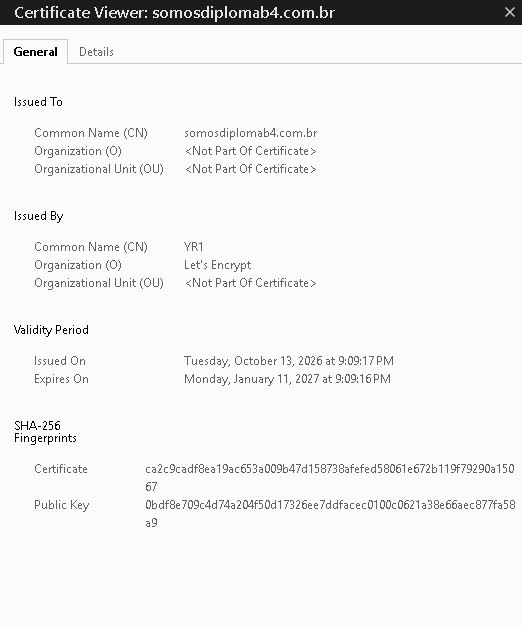
I checked the certificate shown by Microsoft Edge. It shows a validity period from May 11, 2025 to September 26, 2053, instead of the Let’s Encrypt certificate issued on October 13, 2026, which expires on January 11, 2027.
The certificate viewer also shows incomplete subject and issuer information (CN = *).
This suggests that the server may be serving a different or invalid certificate. Could you please investigate the SSL configuration for my domain?
Please note that installing an SSL certificate can take a while to have effect on your website. The message when you install the certificate says 1 hour, but that’s an estimate, it might take a bit longer than that.
How much time was there between you installing the certificate and opening this topic?