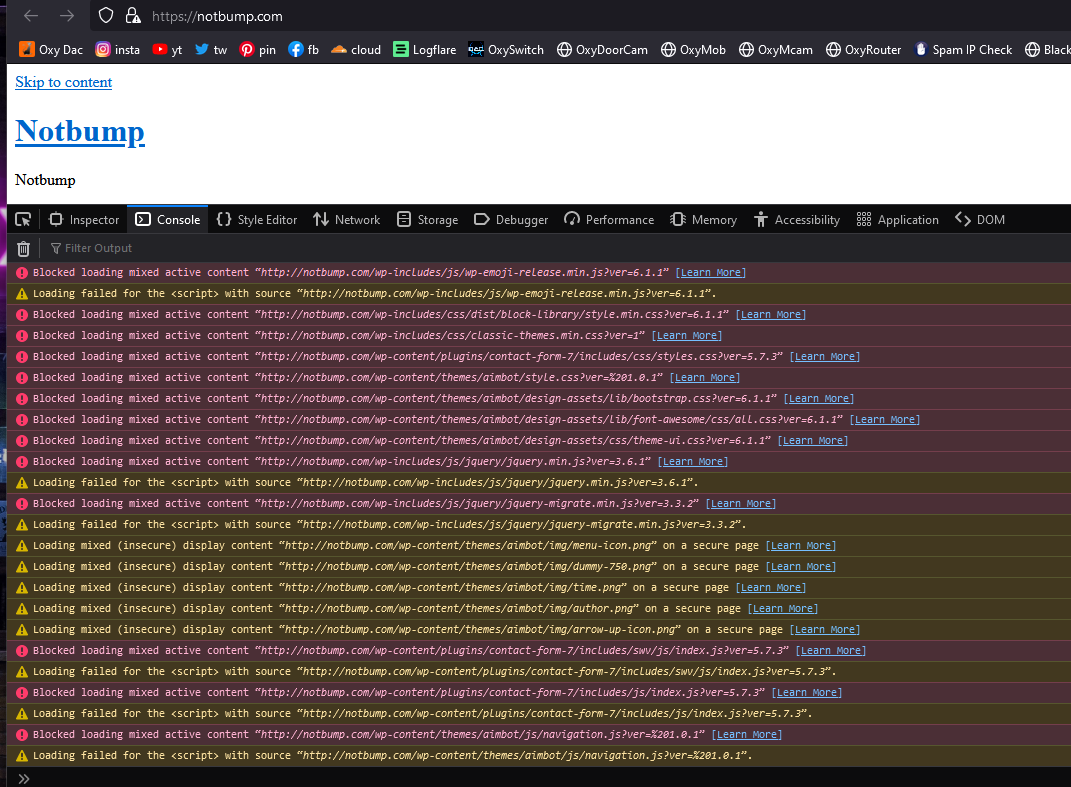
I tried installing wordpress on my website (notbump.com ) but its looks kinda weird.
Did i do something wrong? i never used WordPress so i have no idea
Oxy
February 16, 2023, 10:47am
2
it’s probably mixed content judging by your screenshot
When HTTPS is used, all resources should be requested via the HTTPS protocol and not via HTTP.
I also see that Cloudflare is being used
now I see an almost empty dir. listing
no this doesn’t charge anything
Oxy
February 16, 2023, 8:07pm
4
as you can see 99% is HTTP and not HTTPS
try all 5 - in order from the article I mentioned
after each step, first review the page and look in the browser console also (F12 - dev tools)
Admin
February 16, 2023, 9:40pm
5
I see you’re using Cloudflare and WordPress together. Those two don’t play well out of the box together due to how WordPress checks whether HTTPS is being used.
To fix that, you can do this:
By default, Cloudflare uses a system called “Flexible SSL”. In this system, Cloudflare secures the connection between your visitors and Cloudflare, but not the connection between Cloudflare and your website. Not only is this less secure, some websites (notably WordPress) have trouble detecting whether HTTPS is in use, causing all sorts of issues.
The best way to resolve this is by using Full SSL in Cloudflare. This way, the connection between Cloudflare and your website is encrypted, and your w…
Or you can do this:
WordPress is a great and very popular website building tool, and Cloudflare is a great way to get HTTPS on your website for free. Thanks to Cloudflare’s Flexible SSL system, you don’t even need to manage SSL certificates to use it!
However, getting WordPress to show a padlock and make all pages work can be a bit tricky. This article explains a good way to configure your website correctly with Cloudflare Flexible SSL.
Heads up! Instead of making WordPress work with Flexible SSL, you can also c…