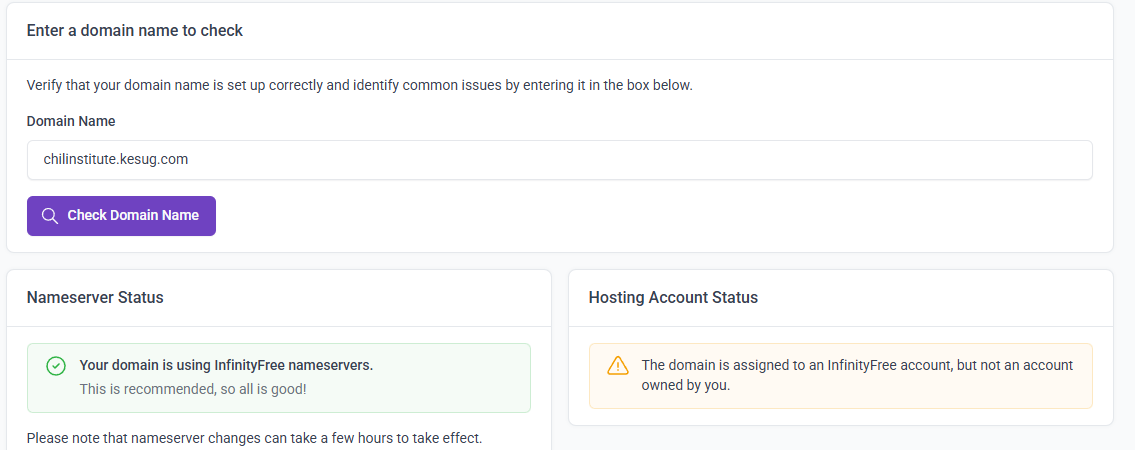
My A has not pointed to your I.P maybe weeks and I still get the message: Your InfinityFree account if0_37944606 (Website for chilinstitute.kesug.com) has been temporarily suspended.
My question is this: does the suspension happen even without active usage, or is it an automatic action by the system? I’ve noticed it usually occurs around 9:04 p.m. or 2:04 a.m. If I’m not actively using the resources, why do I still experience suspensions? To exceed the resource limits, I would actually need to be using them.
Other Information
My conclusion: No one is hitting their limits. This is just a way to embarras those you claim you are giving free hosting. As a school, we have very few people visit our site because what we run are short courses and not a traditional university,
We are not even using your IP address on our A record in cPanel, since we connect through Cloudflare instead. If the A record is pointing elsewhere, how are we still receiving suspension emails from your system? How can an account be suspended for resources that are not actually being used?
Are you sure you understand how this works? A website functions only when its A record is pointed to the hosting server’s IP address. As I mentioned, we are not using Infinity’s IP, so we shouldn’t be receiving any suspension notices based on the fact that we are not hosted with Infinity.
Why is there confusion here? InfinityFree’s IP is 185.27.134.115, while our A record points to x10hosting.com at 198.91.81.11.
Our site is no longer hosted on InfinityFree. It used to be, which is why we are asking: how are we still receiving suspension emails when we no longer use InfinityFree? Please review how DNS and hosting work before responding further.
Because you apparently didn’t deactivate the InfinityFree account before leaving. chilinstitute.kesug.com is still an active free subdomain on InfinityFree.
And sure enough trying to go to it takes me to InfinityFree’s suspended domain page. So the system isn’t broken, the account really is suspended. It’s just confusing because you no longer have your custom domain on the hosting account. However, the free subdomain is still there, and that’s likely exactly what happened. For whatever reason, traffic it received was enough to overload your account.
Well, if you say so. But as far as we know, no one really knows about chilinstitute.kesug.com, so I would be shocked if your system is generating hits by itself to overload it, unless that’s not how it actually works.
If you have a look at your account’s usage graphs, you will see that there has been basically constant usage of hits, CPU and entry processes. So there is definitely activity going on.
If your own domain name is not pointing to our hosting but to a different provider, then that domain is probably not responsible for the traffic. However, since the domain is using Cloudflare, I cannot check the actual DNS records to confirm it’s really not pointing to our servers.
Unfortunately, we don’t have more detailed data we can use to see which website is actually responsible for this traffic.
If you think that we’re fabricating fake traffic data to bully you, then I’m not sure why you’re even here. If that’s how little you think of us us, I don’t know what you were hoping to get here except for more lies.
Just because a subdomain is not announced by you does not mean that it’s not being used. To rule out the option, you could try setting up password protection on the subdomain (using the Protected Directories feature in our panel) so only you can access it, or even remove it entirely.
It’s not unheard of for sites, including those on free subdomains, to be struck by excessive bot traffic.
Since you’re not using InfinityFree anymore, I think the best solution would be for you to manually deactivate the hosting account from the client area. Then once it’s fully deleted, you won’t get any email reminders about it anymore.
Following your advice yesterday, we carried out a test. We switched to your I.P, We deleted the website (chilinstitute.kesug.com) and then deliberately sent out an email with our website link to drive traffic. For the first time, we received a notification stating that username if0_37944606 had utilized over 50% of its daily resource limits.
Upon checking the dashboard at the time the email arrived, we noticed the following: Hits Usage Today – 5,119 / 50,000.
This suggests there may be a discrepancy in the way thresholds are set or reported. It might be worth reviewing whether the daily hit limit should reflect 10,000 instead of 50,000.
What makes you think that when the email arrives you must be looking at realtime data instead of data from 6 hours ago?
And what makes you think that the email is about hits, not CPU, EP, and other limits?
Besides, all now I can see is that you are just thinking about how your website cannot get all those hits. With no actual proofs.
Websites are available on the entire Internet. It’s not like something you can completely lock up and keep it to a limited amount of people. There’re ways to find a website even if you didn’t share it.
Did the email notification also say which resource limit you were using too much of? Please understand that there are more limits than the hits limit, like CPU and Entry Processes.
If it’s actually about the hits limit (which it might not be), then don’t get hung up on that 50% usage number. Just remember
The 50% number is probably hard-coded in the template, not an actual metric from your account information.
The actual threshold that triggers the emails might be lower, due to a discrepancy or by design (to make sure the early warning system is actually early).
The hits counter in the client area and control panel displays your actual hits usage, and both the usage value and the limit value are accurate.