brahminstop.in - epiz_25782472
Hello there,
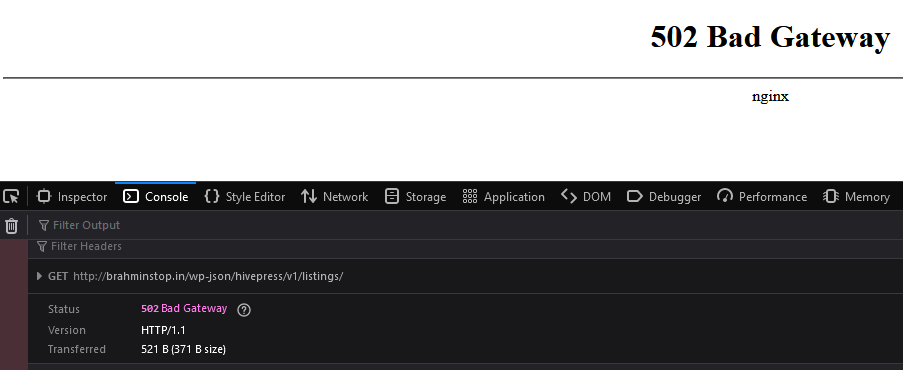
Please find below the error that I get when deleting a listing in HivePress. I’ve continued where @anon61685420 left it. I am facing the same problem. Please advise on how to proceed.

Thanks in advance.
Hello there,
Please find below the error that I get when deleting a listing in HivePress. I’ve continued where @anon61685420 left it. I am facing the same problem. Please advise on how to proceed.
Thanks in advance.
Can you please provide as much detail as possible?
Thanks.
Hey. Thanks for the reply.
My classifieds website runs HivePress. When one tries to delete a ‘listing’ or an attachment, nothing happens. When an expert from HivePress tried troubleshooting, they found that the hosting provider is blocking the DELETE requests coming via REST API. I pulled the above errors from the console in the browser dev tools.
I will give more details
The user he mentions (alf_noob) has this topic
and this is a support forum where the OP (orectique) explained the problem and got the answer at the bottom
and now decided to FW here on the forum to get some guidance on what to do
Thank you @Oxy.
@Greenreader9 what’s so you suggest I do?
Does adding Access-Control-Allow-Origin to .htaccess file help? If so, what domain should be allowed “access”?
Thanks
@Admin would you please weigh in?
Thank you for the answer @anon61010858. Would you please elaborate on how I must proceed?
I can’t stress it enough. PINGING. ADMIN. IS. DISABLED
That is sad, isn’t it?
You have to understand that there are currently much bigger worries that the admin has to deal with
and as soon as he gets some time he will give you an answer
I know. So many outages. I feel bad for those poor fellows.
So, do you have any suggestions for fixing the REST api issue?
Interesting. I’m not much of a tech guy. What does this mean for the website.
Also, I am not using a subdomain. And I’ve my website installed in https.
Thanks.
So much is happening that I can’t even keep up
a lot is done internally on servers
and then other problems appear while e.g. I’m trying to see your website, I noticed that it gives error 502 and then I visited some free subdomains that also had this error in a large way
As I said - that error no longer occurs
but you will have to wait for the admin to give you some answer regarding your first problem
Okay, thank you. One last question. What do you suggest I do now?
The only solution I can think of is to move the site to AWS or Azure. I guess that would solve all my problems.
Thanks for your help.
That will, but you can also move to shared hosting services to solve your problem.
Can you check the Network tab in your browser to see which URL returns the initial 403 error?
It could be that the URL pattern is blocked. It could also be that non-standard verbs (anything other than GET and POST) are blocked, but I’m not sure (not many websites use these other verbs).
Hello.
I think it is https://www.googletagmanager.com/gtag/js?id=UA-197560744-1. I’m really not sure.