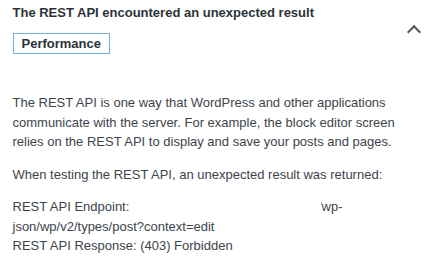
The REST API is one way that WordPress and other applications communicate with the server. For example, the block editor screen relies on the REST API to display and save your posts and pages. When testing the REST API, an unexpected result was returned: REST API Endpoint: http://hire.mrtech.pt/wp-json/wp/v2/types/post?context=edit REST API Response: (403) Forbidden
Other Information
I think some kind of firewall is blocking the URL of the Rest API.
The article shared above specifically states the following:
So access from your browser to the REST API is not affected by this.
As for why it doesn’t work, I don’t know, because it should work.
Do you have any further information about this issue? Checking the Network tab in your browser could help a lot to determine the exact nature of this 403 response.
I strongly belive is what I said because I install classic editor and everything works fine again. And block editors dont work at all. But the same website files and code in other enviroments like dev and another production for testing works 100% normally. I will change hosting provider.
I’m happy to look into the problem, but all I have right now is the fact that you get a 403 error and you believing that it’s a firewall issue. I don’t doubt the 403 errors, but a firewall should not be the problem.
To be clear: I believe the block editors work just fine on almost all websites we host.
As for why you’re having this issue, I don’t know, and I would like to find out, but I need your help for that to gather more information about the problem.
I tried in multiple install of worpdress. Both have the same problem. And both worked until a few day’s ago. After I investigate the problem the wordpress team say’s must be a firewall rule from the hosting company. Because block editors and some other part’s of the wordpress, like posting a page, a post or any other content as a post_type uses API’s and REST API. If any of these api’s are being blocked gives the error “you may be offline”. even with the website totally online and accessable.
If it’s a clean install of wordpress with no plugins, then it’s not a hosting problem. Many people (myself included) run wordpress sites without issues.
It could be that your networks firewall or a browser plugin is causing problems? Although I’ve not got the experience to say for sure
Clean install either uploading the wordpress myself or using the script installer. Without any plugin active or any new theme beside the default still have the same problem. I do not have any plugin/extension in the browser but yes, i tried using other browser including the smartphone. Still same problem. I will migrate the website so the problem goes away.
I can understand you wanting to move, and I wish you the best of luck with your new provider.
Whatever is causing the problems you’re facing, I hope it works properly for you with the new provider
Since the issue was closed (not resolved), the following is for educational purposes and future reference. I did try Google and this issue seems to be persistent for years. Even in Wordpress forums! And there is no single consensus about the solution, some threads were left without a solution. But I read about and saw editing “/etc/hosts“ a couple of times solved it and also a related loopback error. I don’t know if this is possible with us as this requires reading and accessing server logs. There is also a reported issue with Cloudflare and Wordpress as seen on https://www.reddit.com/r/CloudFlare/comments/1p38t9y/cloudflare_and_wordpress_site_could_not_complete/ (which is still very recent!). OP seems to be using a custom domain and Cloudflare. It is unknown if OP tried anything as suggested in those threads as Cloudflare could be the culprit. And if I’m not mistaken do free subdomains benefit from CF protection as well?
Thanks for the info. I tried recreating this first in local then uploaded on IF. The problem (in the uploaded version) appears to be one among of several recommended improvements by Wordpress found on Tools → Site Health → Site Health Status.
It is unknown if this is really a critical issue experience by OP. However, I tried using the block editor and it seemed fine. The functionality doesn’t appear to be affected, thus this could be a minor annoyance unless proven wrong.