“Connection timed out after 20 seconds of inactivity. Could not connect to server”.
Other Information
I’ve tried using my domain name and my IP address. I’ve tried using no Port value and 21 for the Port. And I’m using SFTP. But I can’t get the connection to work. When I created the domain on 8/10, I got a message stating “Domain howto.rocks not resolving”. Would that be why I can’t FTP? Otherwise, can you provide any guidance?
This is probably why it doesn’t work. All our instructions list an FTP hostname to use, which is ftpupload.net. Our FTP server is separate from the server where your website is presented, so trying to connect with FTP to your own domain name won’t work.
Please be aware that SFTP is a completely different protocol from FTP. We support FTP, not SFTP.
Using FTPS is fine though. That just means secure FTP, which our servers support.
FileZilla, our recommended FTP client, does FTP over TLS by default, which is the setting you want.
Did the message say that FTP was affected? Because if it doesn’t say that FTP is affected, you can safely assume that FTP is not affected.
If you’ve confirmed/updated the above and it still doesn’t work, it would help to know more about what exactly happens during your FTP connection. FileZilla can tell you that, and we have a guide on how to get that information. If you could share the logs here, we can help dissect them for you.
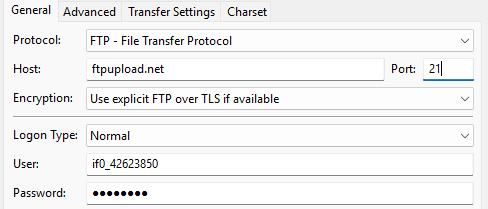
Thank you for the information. I did make some changes and tried again. It still failed, but with different results. Here’s the settings that I used (I’ve only made changes to the “General” tab):
Status: Disconnected from server
Status: Resolving address of ftpupload.net
Status: Connecting to 185.27.134.11:21…
Status: Connection established, waiting for welcome message…
Status: Initializing TLS…
Status: TLS connection established.
Status: Logged in
Status: Retrieving directory listing…
Command: PWD
Response: 257 “/” is your current location
Command: TYPE I
Response: 200 TYPE is now 8-bit binary
Command: PASV
Response: 227 Entering Passive Mode (185,27,134,11,56,209)
Command: MLSD
Error: GnuTLS error -15: An unexpected TLS packet was received.
Error: The data connection could not be established: ECONNABORTED - Connection aborted
Response: 150 Accepted data connection
Error: GnuTLS error -110 in gnutls_record_recv: The TLS connection was non-properly terminated.
Status: Server did not properly shut down TLS connection
Error: Could not read from socket: ECONNABORTED - Connection aborted
Error: Disconnected from server
Error: Failed to retrieve directory listing
What I see is that there is no problem with the settings you’re using. You’re connected to our FTP server and are able to login successfully, so that’s all good.
The FTP connection is breaking when FileZilla tries to setup the data connection, because it’s receiving invalid data.
The most common reason for this is something in the network that’s interfering with the FTP connection, for example:
Antivirus software or firewall software that’s intercepting the connection to check it for harmful data, but is breaking it in the process.
A router with an FTP ALG helper, a feature intended to “optimize” certain connection, but generally just end up breaking things instead.
Here are some things you could try:
Check your antivirus settings for anything related to SSL connection scanning. Windows Defender doesn’t do it, but various other antivirus software does. Try disabling that feature and see if it helps.
Try to connect form a different network, like a phone hotspot. That helps to rule our any network level reasons for this issue.
That seems to have worked. Once I bypassed my router, I was able to transfer the files via FileZilla. Now I have a new issue with a 403 forbidden page error. But I’ll create a new post for that.