Website URL
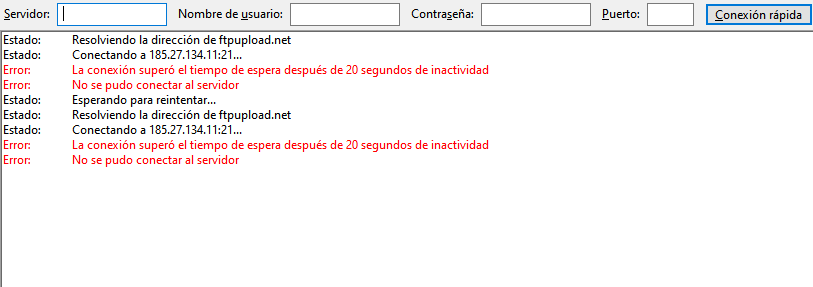
Error Message
I’ve been trying to log in to the server for quite a while now to update the website, but it isn’t responding. Can you fix this?
The website isn’t down; I just can’t connect via FTP to update some sections.
Right, I misunderstood.
Can you share the Filezilla logs? or the logs from whatever FTP client you use so we can see if there are any errors?
The FTP client tries to connect several times, and after a period of inactivity, a message appears saying it couldn’t connect to the server. This concerns me because yesterday I was supposed to make some changes to the files that are online, but I wasn’t able to do so. Uploading files through the control panel is inefficient.
That log output looks to me like FileZilla just cannot connect to the FTP server. The IP address is correct, so that’s not the issue, but there could be a firewall or other security filter blocking you from using FTP, or at least blocking you from accessing our FTP server.
As a few first checks, can you see if you get the same issue on a different device or network? Maybe try to connect over a VPN or a mobile hotspot and see if that helps. Or try from a different computer.
Hello! I’m still unable to connect via FTP (FileZilla) to my account. Here are the details and diagnostics I’ve gathered:
Account: if0_42412340
FTP host: ftpupload net
Port: 21
Diagnostics performed (from my Windows machine):
The free hosting servers are designed to not respond to ICMP requests, nor does the FTP server have any port open other than the FTP ports. So while pinging and port scanning is a standard procedure it unfortunately do not provide useful information.
The traceroute result could be useful, but from your description it sounds like the exact opposite: your ISP is blocking the request. Otherwise you’ll at least see the FTP server IP in the logs.
If I’ve been using and uploading files to the hosting service for several months, how is it possible that, all of a sudden, I can’t connect? Isn’t there a way to fix this? For several days now, I’ve needed to make some changes to the application that’s online, but I can’t do it because of this issue. I need you to tell me what to do or to take action on the hosting side. Thanks!
Everyone is telling you some possible ways. But you didn’t try them, you just kept asking the same question over and over. Of course this is not going to help.
Admin asked you to try using a VPN and change networks, or checking your firewall or antivirus. You end up performing some generic checks and called it a day. I told you it’s probably your ISP blocking you, but instead of asking your ISP you kept asking on this forum.
This is a community forum. We can point you at the correct direction, but we cannot just fix things for you. You need to actually do something to get your issue sorted out.
The way InfinityFree is set up, the online file manager is really just a browser-based FTP client. If the FTP server was down, the online file manager wouldn’t be working either.