The website loads correctly over HTTP, but over HTTPS some CSS files are blocked due to mixed content.
In the SSL section of the control panel, it says “No SSL certificates found”.
I have already tried clearing Elementor files and data, replacing the old local URL (http://letena.local) with the public domain, and checking the WordPress URL settings.
Update: The issue has been resolved. I updated the WordPress URL constants in wp-config.php to use HTTPS and regenerated the Elementor CSS files. The site now loads correctly over HTTPS, and the connection is secure.
Welcome to the InfinityFree community forum! Good to have you here.
Most people answering here are volunteers. They’re often the fastest source of help. Admin (the only staff member) checks in about once a day for issues on our end.
Volunteers can’t see your account or website. Share what you actually see, like error messages and what happens when you try something. That’s more useful than your theory of what’s wrong.
AI tools often get InfinityFree wrong. If a volunteer’s advice differs from what an AI told you, please try the volunteer’s suggestion first.
Solving an issue is a joint effort. Try the suggestions you get and report back what happened.
Beep boop, I’m a bot! I dug through the forum to get you started. I sometimes get things wrong though, so do with this what you will until a human has a look.
Your subdomain is a direct subdomain, and per our article all free subdomains are covered by a system-wide SSL certificate that’s active from the moment they’re created. There’s nothing to install, so the empty SSL section in the control panel doesn’t mean HTTPS is missing.
So I’d like to know whether the certificate error comes from your side or ours. Does https://letena-portfolio.freepage.cc show the same NET::ERR_CERT_AUTHORITY_INVALID on a different network (for example your phone on mobile data) or in another browser? And if you click through the warning, what does the certificate details view say it was issued to and issued by?
The mixed-content CSS blocking is a separate matter. The same article says WordPress needs its site URLs set to https:// (Settings > General) before HTTPS pages load cleanly. That only helps once the certificate itself is trusted.
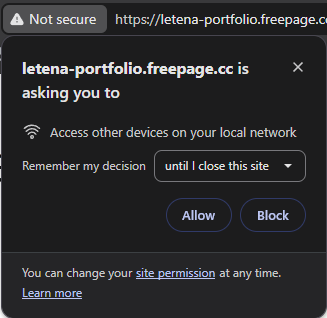
Your site should not be asking to access devices on my local network
–edit–
To clarify the are situations where it’s legit for a site to ask to access other devices on the visitors network. But for a site to just immediately ask for it with no explanation comes across like a serious security issue
Thanks for pointing this out! I’ve looked into it and made some changes. The site is now working over HTTPS, and the local network access prompt no longer appears. I appreciate you bringing this to my attention!