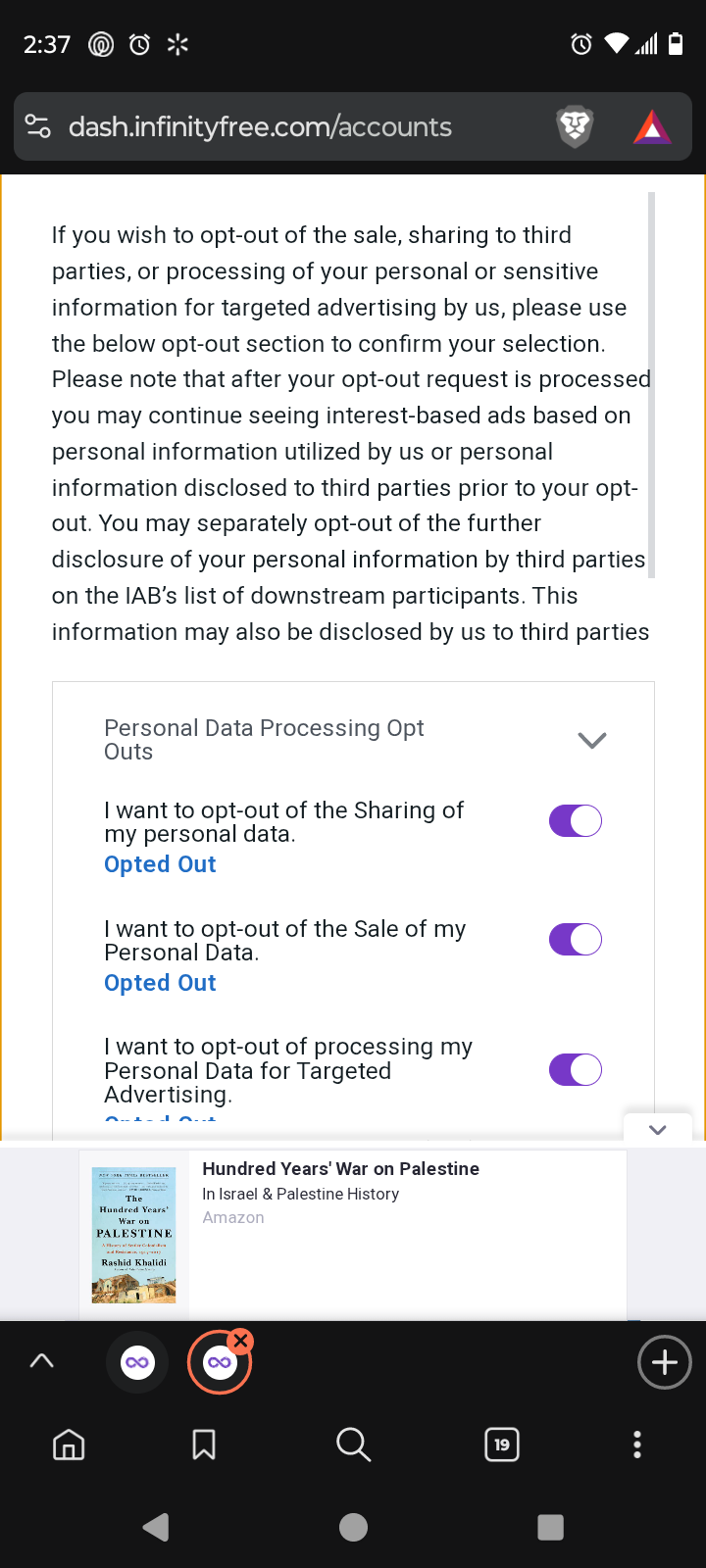
After login into the account it appears the modal ‘We value your privacy’ which covers the entire screen of a smartphone. It’s practically impossible to tap on the ‘Agree’ button as it disappears after scrolling to the bottom. Moreover there’s an ad banner which is not possible to minimize that most likely covers the buttons.
Other Information
The same problem occurs on Chrome as well as on Samsung Internet browser.
Thus, I cannot access my account on a smartphone. I need at least a tablet.
I checked the issue and I am unable to reproduce it myself.
When I test our website on a phone sized screen, the modal is appropriately sized for the smaller screen and doesn’t fill the entire height of the page. You do need to scroll to read the entire text, but the buttons are easily accessible.
No ads should load until you’ve finished interacting with the consent screen (as your choice there determines how ads can be loaded), so it also shouldn’t overlay with the content popup.
Okay, I just tried visiting the dashboard on my own Android phone (Android 14, Moto G Play - 2024) using Brave, and I have the same issue OP does. The ad at the bottom of the page loads despite the consent box not being agreed to, and the ad is in the way of agreeing to it.