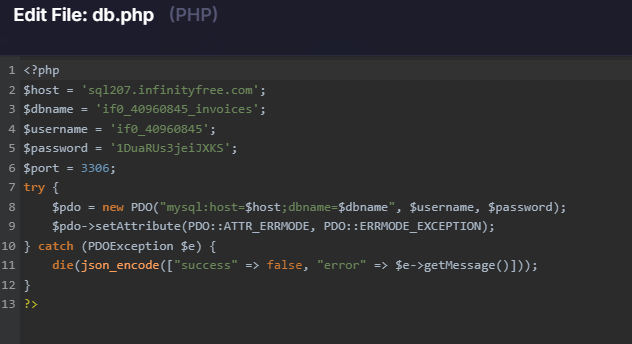
A database error saying “No such file or directory” can mean only one thing: it means you’re using localhost as the database hostname.
This can be because you’re specifically passing that, or because you’re not passing a database hostname to the MySQL connector (MySQLi or PDO) at all, and it is using localhost as the default.
The value to use is probably sql207.infinityfree.com (it looks like what a database hostname should look like). So please check your code and make sure that this setting is also passed to the database connector.
However, I’m now getting a different error:
SQLSTATE[HY000] [1045] Access denied for user ‘if0_40960845’@‘192.168.0.53’ (using password: YES)
The hostname is correct, credentials are correct (they work in phpMyAdmin), but PHP scripts are getting “Access denied” when trying to connect remotely.
Could you please enable remote MySQL access for my account if0_40960845?
It’s not about “remote MySQL access”. Yes, it’s a domain, it’s not “localhost”, but everything is still happening within the hosting.
This error suggest that either your password or database name is wrong. I don’t know how did you “verify the password is correct in phpMyAdmin”, because our phpMyAdmin straight up doesn’t have password login.
Please change your database password immediately! This is a public forum which is indexed on Google, so by sharing it here you’ve made it to where everyone can see it. Though considering the situation, resetting the database password is a logical next step anyway.
I don’t know where you read that, but SQL access is not disabled for new accounts. And if it was, it’s unlikely that there would be a way to “manually” enable it earlier than intended.
There is nothing about the error message that suggests you don’t have access to the database server, especially since you can use it from phpMyAdmin. As long as the connection is coming from inside your website (and not elsewhere) there isn’t anything from preventing you from using it.
I have two points of good news, thanks to one thing: the password you are using in your configuration is not correct. It’s very similar, but not identical, so it’s not accepted. This also means that your account is probably safe, but I still reset your hosting account password just to be sure.
Please copy the current account password from the client area and put that in your website configuration file. I strongly recommend copy-pasting, not typing it by hand, or it’s very easy to make a mistake that may be difficult to spot.
But please do make sure that you keep your passwords safe from now on. This is a publicly accessible forum, you should really not share sensitive details here.