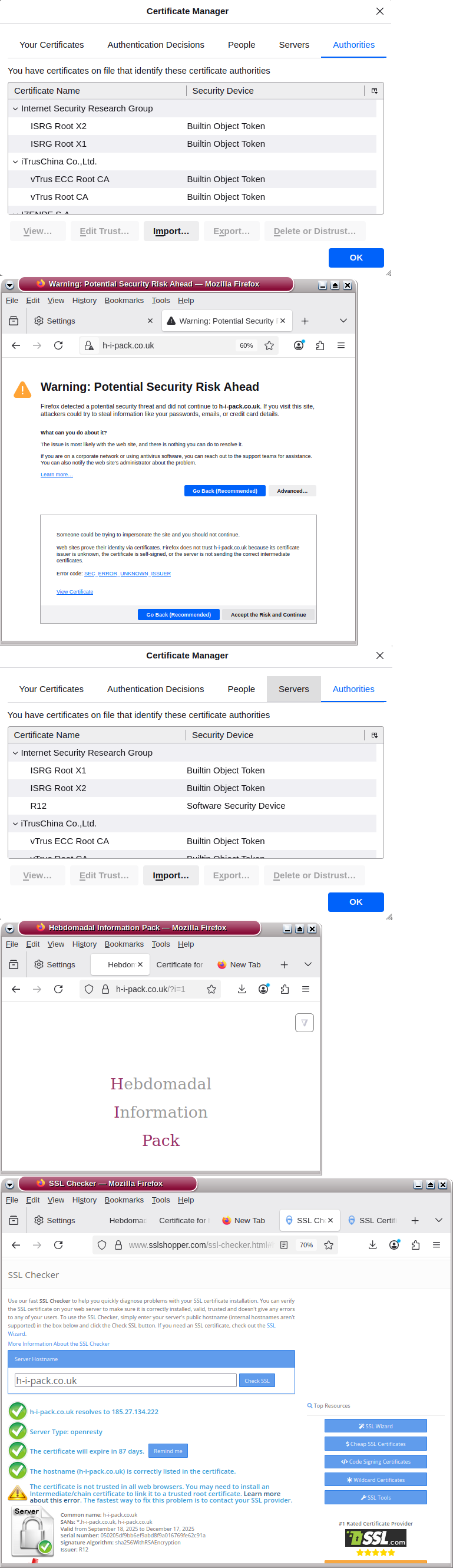
Firefox shows a security risk, unknown issuer error
Other Information
Accessing this site over https with Chromium is ok, but Firefox blocks access.
I installed the Let’s Encrypt certificate using the automatic option in my account.
I believe the problem is that the server is only sending the domain certificate - not including the R12 intermediate certificate which isn’t stored in Firefox by default. If I import that certificate into Firefox, https access is then ok. But how many visitors would do that?
The server certificates from other sites using Let’s Encrypt I’ve checked all include the relevant intermediate certificate.
Can the R12 intermediate certificate be added to the h-i-pack.co.uk certificate on the server?
Hello, and Welcome to the InfinityFree Forum @Saerwyth!
To my knowledge, installing an intermediate certificate is not possible. If your users are experiencing issues with Let’s Encrypt certificates, try using a different one like Google Trust.
I have just checked your website with Firefox, and I didn’t have any issues.
Please make sure you are using an up to date version of Firefox and the operating system you run it on. Outdated software may have trouble validating SSL certificates.
While reading a bit on the topic, I saw an announcement from Mozilla saying that they effectively solved the problem of missing intermediary certs in 2020. So please make sure you’re using a version of Firefox that’s newer than that.
The thing is that this “missing intermediate certificate” thing is the expected behaviour because you cannot install chained certificates on free hosting.
This setup works just fine on many browsers as they will just find the missing intermediate certificate. I would recommend to check whether the ca-certificates and other related package is damaged as well as if there’re any relevant settings in your browser.
Almost all web browsers don’t need the intermediate certificates and will just figure it out on their own. Either by downloading all known intermediaries into a local store or using the AIA field in the certificate to locate the issuing certificate, which the browser can then follow to link the certificate back to the root.
You say you are on an ESR release of Firefox? Are you then on a regular consumer device or is this an organization managed computer? If it’s the latter, the organization may have disabled the mechanisms that allow the certificates to work without intermediaries.
“The thing is that this “missing intermediate certificate” thing is the expected behaviour because you cannot install chained certificates on free hosting.”
Yes, this issue is caused by infinityfree not including the ca-bundle (i.e. intermediate) certificate on the server. I don’t accept this so have moved my site to another hosting provider where it is included and my site now renders perfectly - no more Firefox security warning.