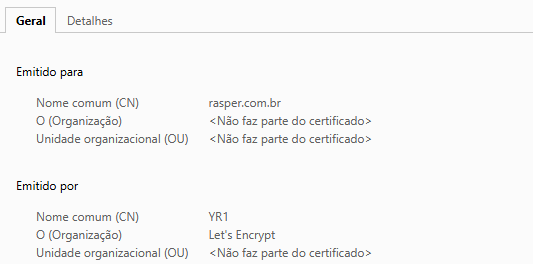
Opening https://rasper.com.br gives NET::ERR_CERT_AUTHORITY_INVALID and then 502 Bad Gateway (openresty). Port 443 still serves the default self-signed certificate (CN=*), and the “Verify Installation” step in the client area shows “Not Found”.
I ordered a free Let’s Encrypt certificate in the client area on 2026-10-20 at 18:25 UTC. The DNS validation passed, the certificate was issued (expires 2027-01-18) and I clicked “Install SSL Certificate Automatically”. In the control panel, under SSL/TLS for rasper.com.br, the private key and the certificate are both saved.
About 6 hours later the server still shows the default certificate. I installed the certificate again at 00:25 UTC on 2026-10-21, with no change so far.
DNS: rasper.com.br has an A record to 185.27.134.222, www is a CNAME to rasper.com.br, and the nameservers are at Umbler. The site works over plain http.
Is there anything else I need to do on my side, or can the certificate be pushed to the server?
Welcome to the InfinityFree community forum! Good to have you here.
Most people answering here are volunteers. They’re often the fastest source of help. Admin (the only staff member) checks in about once a day for issues on our end.
Volunteers can’t see your account or website. Share what you actually see, like error messages and what happens when you try something. That’s more useful than your theory of what’s wrong.
AI tools often get InfinityFree wrong. If a volunteer’s advice differs from what an AI told you, please try the volunteer’s suggestion first.
Solving an issue is a joint effort. Try the suggestions you get and report back what happened.
Beep boop, I’m a bot! I dug through the forum to get you started. I sometimes get things wrong though, so do with this what you will until a human has a look.
This matches what our install article describes. After installation, it usually takes a few minutes for the certificate to take effect, but it can take longer than an hour. Until then, Verify Installation shows “Not Found”, and browsers can show a self-signed certificate or NET::ERR_CERT_AUTHORITY_INVALID. The article also says it may help to install the certificate again, which you did at 00:25 UTC.
There’s nothing else you need to do on your side that I can find. Your A record points to the website IP of your account, and the certificate and key are saved in the control panel, so nothing in your post looks wrong. I’d give the reinstall some time to take effect, since it was only a few minutes before you posted.
The article suggests an external SSL checker as the best way to see what the server is serving:
If you check rasper.com.br there a while after the reinstall and it still shows the default certificate, tell us what it says. Also tell us if the 502 Bad Gateway still appears on its own.