I first created a website on here called thefearlessfloydshow.ct.ws, and it has had no issues and has been working just fine. I was able to create and edit numerous web pages per day and never had a CPU issue. When I first signed up for the free website hosting, I ran into an issue after downloading and installing a lot of plugins to test. I went over the daily CPU usage for the day. The following day, I deleted most of the plugins, and this corrected the issue. When I was on the free hositng I was running the website, it had 81 pages and a ecommercial page for selling. I had no issues at all, and most days I never even used CPU time. I was satisfied with the new site, and it was running fine. I contacted the domain name hosting company and had them move the website’s domain name. I did run into some issues migrating the website across. The person who was helping to migrate the site made several errors. This was a major issue for me because now I had to edit all the pages on the website to add back the images. For a second time, I had a CPU issue, and I believe it was my fault for all the editing I was doing.
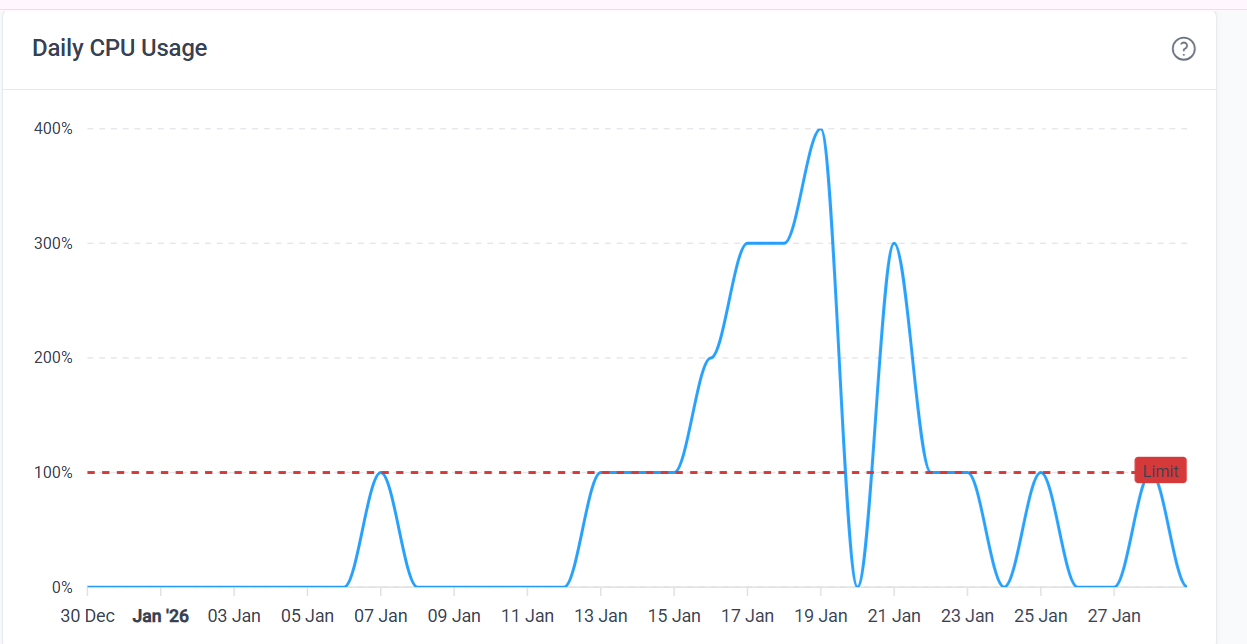
However, now the site is up and running, and I just noticed something very strange. It seems I have a new graph that shows the CPU usage, and it appears that 75% of the CPU time has been removed from the account. Looking at my graph, I can see days when I edited the website and the increase in CPU time. On these days, it never reached the CPU limit. However, now with this new graph, most of my days it has exceeded the CPU limit. I can no longer add a new webpage, edit a webpage, or work on the website without exceeding the CPU limit. I continue to monitor the CPU usage and an example is today and yesterday. I created a new webpage. During the creation of the page, I noticed that the CPU spiked, so I stopped. Immediately after, it claimed I had reached 100 percent. I did not edit for 2 days to allow the CPU to go back to 0. Now, today, I edit the new page, and the same issues arise. I can no longer edit pages or do anything without spiking the CPU time. Nothing on the website has changed since I created it. This is the first time I want to add a new page to the site, and it is impossible to do that.
What has changed with the CPU daily usage, and why did my CPU usage go so low? Was there a reason for this?
I have not changed what I was using to run and build the website. I have always used WordPress and the Elementor addon. I built the website and had 79 pages. When I built the site, I never went over the CPU usage. I was always way below the daily usage. It is after the newest updates to the graphs on the account statistics page that I see the CPU usage change. I will try to attach the image. In this image, you will see 2 spikes. When the spikes came, I did ot exceed the daily CPU time.
Do you see the 2 spikes? Last week, I was well within the daily CPU time. I did not go over. After this new update, my line for daily limit has been reduced by 75 percent, and now it seems I cannot even edit 1 page a day.
On my side, nothing changed. All I did was add the custom domain name that I pay for through GoDaddy to the website. When I first moved or added the name to the website, all was fine. It has been 1 week now, and I notice that my daily usage has changed, and I see it in this graph. Today, I tried to work on a Q&A page for the website and could only add a very small amount of text before it showed that the usage spiked, and I just stopped so that my account would not be suspended for 24 hours. Last week, the red line for my graph was at the 400% mark, or at the top of the highest spike for me. If this makes sense. The day that my CPU usage spiked was my fault. I was editing my pages and redoing the site’s images. After this, I have not been editing or even adding a page until 2 days ago, when I started to create a Q&A page, and it is not even possible for me to add a very simple page to the website anymore. I have always been mindful of the CPU usage for the site and have never had an issue until this week, when I hit the limit if I try to edit one page on the website. For several month this was not an issue, and I was able to add, edit, and modify the website daily.
Thank you so much. I have monitored the CPU usage since the first week when I opened the account. I made an error the first week I used this service and added unnecessary plugins to my account. I had my account suspended for 24 hours. I deleted the plugins and didn’t have another issues until I decided to swap out the images on my web pages, then I exceeded the CPU time once again.
I am worried because after this update, it appears that I cannot even add a new web page to my website without exceeding the CPU time each day. I have to take 5-8 days to add one element or text box each day to create the page. I have never had this issue before, and I have no idea what has changed. The only changes I see after the update are that the limit line has changed, and I can no longer add pages to the website or edit them as I did a week ago. There does not seem to be a bug in the client area at all, and it shows the same data as the control panel does. So it appears after the latest update I have 75 percent less daily cpu time than I had a week ago and I can no longer edit my website without exceeding the cpu daily limit.
The graph in the client area is definitely wrong. I just pushed a change to fix this, it should be live very soon. The graph in the control panel is accurate though.
As for “how is it possible that I used 4x the limit”, the reason is that there is some delay between when the usage is happening and the account actually being suspended. The system first needs to gather the data, check that the limit is reached, and then perform the suspension. During that delay, your website is still active and can generate additional server load, which is how you can exceed the limit.
Thank your answer. I do not mean to be difficult on my side. I have been here for a few months now. I was able to build my website, make changes, edit, and add more pages to my online store. I have not had an issue with any of this. It is only this last week that things changed drastically on my side. I have never had an issue creating a new page before. But this week it is impossible to do a simple webpage without exceeding the cpu limit. I have no idea what has changed. I have not installed any new plugins and only have 4 active. I needed these for the online store I set up. All I kow that nothing on my side has changed. Now I see where you say I went 400% over the normal cpu usage. A week ago, this was not the case. The line for my limit was at the top of the graph and now all the way on the bottom. Lat week the two spike in my graph were way within the limits of the daily usage and the maxinum usage that the hoster has allocated for each account. It was this week I saw the red line drop all the way donw to the green line and that is where it stays. I will try one more time to try and finish my webpage to see i I can get it done. If I still have this issue and I do not want to be suspended for usiong too much of the CPU then I will have to look into the hosting company you suggest. I just did not want to do this right away because it is like 3 days of downtime and moving this across. Oh well, if I do not have another option, I may have to do this one. You have a great web hosting company, and I do appreciate the fact that you can build websites here and host them for free. Thank you for your gre\t service.
Unfortunately, we don’t really have a way to see what on your account is generating the CPU usage. So all we can do is guess.
I had a quick look at your website and while you don’t have that many plugins, I do see Elementor, Jetpack and Updraft among them. I don’t know which of these plugins is actually enabled, but I can tell you that those are all three quite resource heavy plugins.
As for why this is causing trouble for you now when it didn’t before, I really have no idea.
Thank you. I installed the Jetpack on my website, but it was not what I really wanted, and I have deactivated it, but it still shows as if I have downloaded it. Is it best if I just delete it because I am not using it? I am not using UpdraftPlus either, and I deactivated it, but it is also listed in my plugins. Maybe it is best if I just remove them. The only plugins I am using are Simple Cart and Elementor; that’s it. Everything else that I have downloaded and installed are disactiated and no longer in use.
One last question. I created my account to run and build a new website. I have a paid domain name and so I just cre\ted an account with the same domain name and used .ct.ws. Now I have switched over my paid domain name and it is associated with the website I built here. I may have an idea why this problem may have arisen. It appears that the site I built on here is still up and running. When I had the domain name switched over to here, it showed up as a separate site. So if you do look at my account, it seems like I am running two separate websites with the same name, but oe ends in .ct.ws and the other ends in .com. How can I remove the .ct.ws website and just keep my .com.
I am not sure if I should remove it or not because it seems I had some issues when I had my domain name moved here. There was a person who was doing this, and he ended up going to my file manager and deleted the contents of my htdocs folder. This removed my website, and I could no longer see it. Lucky I had a backup of the website and also the htdoc folder and was able to rebuild it. Now in my file manager I see a htdoc folder plus now I see a new folder called thefearlessfloydshow.com, and inside there is a htdoc folder also. If I edit one, the other is automatically edited.
How can I safely delete the domain thefearlessfloyshow.ct.ws and not lose my other website?
If the plugin is installed but not enabled, then it won’t affect your site’s performance. I just looked at the list of plugins in the wp-content/plugins/ folder, not what was actually enabled.
Editing the files in one folder also causing changes in another one is not suppose to be possible. Deleting the original htdocs folder, or anything in it, should be completely safe and not affect the files of your other website in any way.
Still, if you don’t feel comfortable doing that (and are not at risk of hitting disk usage limits), you can just leave the files. You can also just remove the subdomain from the account. Doing so will not remove the associated website files, but will prevent the subdomain from hosting another copy of your website.
Thank you how do I go about removing ther subdomain name.
BTW it seems like my CPU time is leveling out now. At least I am able to create and edit a webpage without reaching the daily CPU time. This week I had issues with just creating one page and could only do a little each day so I did not extend my CPU time.