Website URL
ttps://cuidotodo.free.nf/install/?action=requirements
Error Message
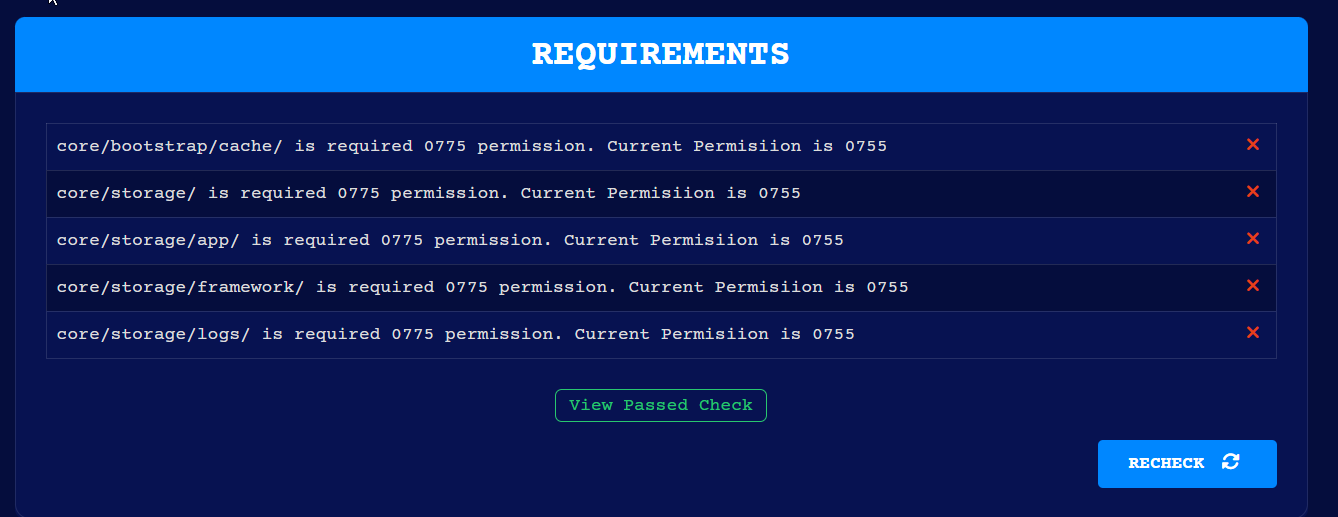
I need to set a folder on my site to 775
Other Information
Please Help
Unfortunately that’s not something we can do. Chmod is not available on free hosting. Sorry
Ps welcome to the forum
If I take the 2 dollar hosting can I chmod then. if not I cannot use my site
I mean if I upgrade to the one that is 2 dollars in change per month
The premium hosting is provided by iFastNet. So that’s not something I can answer.
However as you’ll see in admins post here
The permission is set to 755 that functionality will work for all web software. However a lot of Devs look for 775 which in this case shouldn’t be needed
No its not I tried filezilla and others and still can’t change permissions. This is so frustrating.
Unfortunately there’s nothing we can do to change that.
To explain chmod permissions the 3 digits represent:
7 is read write & execute
5 is read & execute
4 is read only
The only process that will touch your files here (and on most shared hosting) is run as your account. So only the “user” permissions need write permissions.
I understand that the script is saying it needs 775. But that’s a limitation of the script.
Disclaimer: I do not work for infinityFree and the above is my understanding based on my own experience both here and private hosting
Premium hosting uses the standard cPanel so it probably have chmod.
@dan3008’s explanation is on point.
Your website is already fully able to read and write to the directories shown in the installer. The fact that the installer of your website says it doesn’t work is simply the result of the developer of the software incorrectly believing the permissions MUST be 775, even though there is no practical difference between 755 and 775 in most cases.
We have disabled chmod on free hosting because we saw a lot of cases where people started to mess with file permissions and ended up locking themselves out of their own files. Meanwhile, in over 10 years of running InfinityFree, there has not been one single case where any website could not work as intended that could be solved by changing file permissions. But one oversight in this decision was that some script developers can be extremely picky about file permissions and claim that directories are not writable even when they are.
It’s food for thought for us, but we’re not going to enable this again just like that, and we are not going to make an exception for you.
So here is what you could do: