Website URL
Error Message

Other Information
i cannot gointo the softaculous app instaler
You have reached your inode limit.
what should i do now
You can reduce your inode usage by deleting unnecessary files. You can find more information if you read the article I provided.
but i cannot acces the files, i cannot access the wordpress dashboard
Why not? If it’s because you can’t access Softaculous, you can still open the WordPress dashboard manually if you know the admin username and password. Failing that, you can delete files manually over FTP or the file manager.
i entre the pasword and username but its show i put the wrong pasowrd orusername, but i put the correct one
Most of the times, cases like yours can be attributed to actual wrong credentials despite the fact that one thinks they are correct.
The WordPress login page doesn’t have any relations to the client area nor the control panel. If you used the same password as dash.infinityfree.com or cpanel.infinityfree.com (or FTP) then it is the wrong password.
Your case looks like that you just let Softaculous generate their password so you don’t know what the password is and can only access WordPress through Softaculous.
In this case, you must login to FTP to delete unwanted files to be able to access Softaculous again.
The title of the article is a bit misleading, as the process is very similar for deleting files.
is there any way to chechk my inodes limit thought my c panel
guide me on where exactly I can see my current inode count and limit? Is it inside VistaPanel or somewhere else?
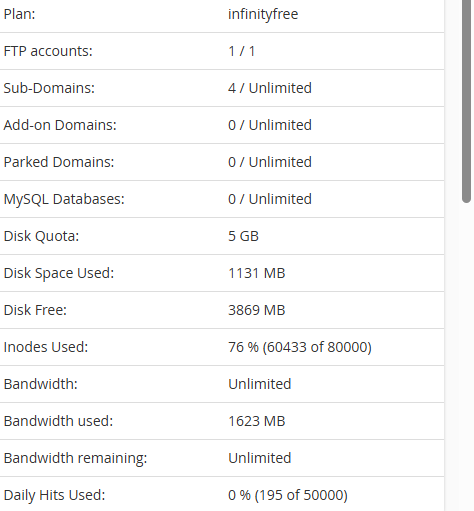
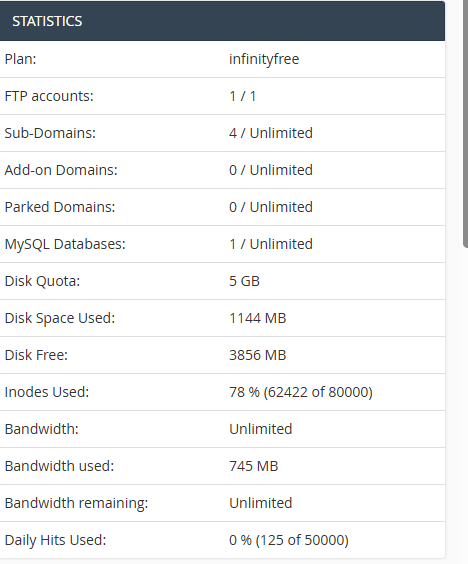
You can find it in the “Statistics” in the Client Area, or in the sidebar of the Control Panel.
Then just try accessing Softaculous again?
i try but its show the same error, iven delet my 2 wordpress website from the hosting but the proleam not solve
https://cpanel.infinityfree.com/panel/indexpl.php?option=error
I’m currently using the InfinityFree hosting plan, and my account shows 78% inode usage (62,422 of 80,000). Despite being well below the inode limit, I’m unable to access the Softaculous App Installer from the control panel.
Here’s a quick summary of my account stats:
• Disk Space Used: 1144 MB of 5 GB
• Inodes Used: 78%
• Bandwidth Used: 745 MB (Unlimited plan)
• Daily Hits: 125 of 50,000
• MySQL Databases: 1 active
• FTP Accounts: 1 of 1
I’ve already:
• Cleared unused files and demo installs
• Verified that my inode usage is below the threshold
• Tried accessing Softaculous from different browsers and device
Please note that this is a community forum, so the trick of posting the same question again to get faster response is neither going to work nor allowed (considered as spam).
Admin may have more insight into this, so please wait paitiently.
I do have a possible explanation though, the inode limit used to be 60000 (which you are currently over) and iFastNet may have forgotten to change this particular check to 80000 after raising the limit again.
I’m sorry for the delay.
This is exactly what happened. The limit was updated but not updated consistently.
That has been fixed now, so accounts over the old 60k inode limit (but below the current 80k limit) should be able to access Softaculous again.
This topic was automatically closed 7 days after the last reply. New replies are no longer allowed.