the new file manager seems to not have rename button
1 Like
ok for real where is the rename, copy, cut, zip and unzip button??? i make a post to show my proof of concept about my modified file manager but u dont want other people to see so tell me where the fk can i find these button? tell me
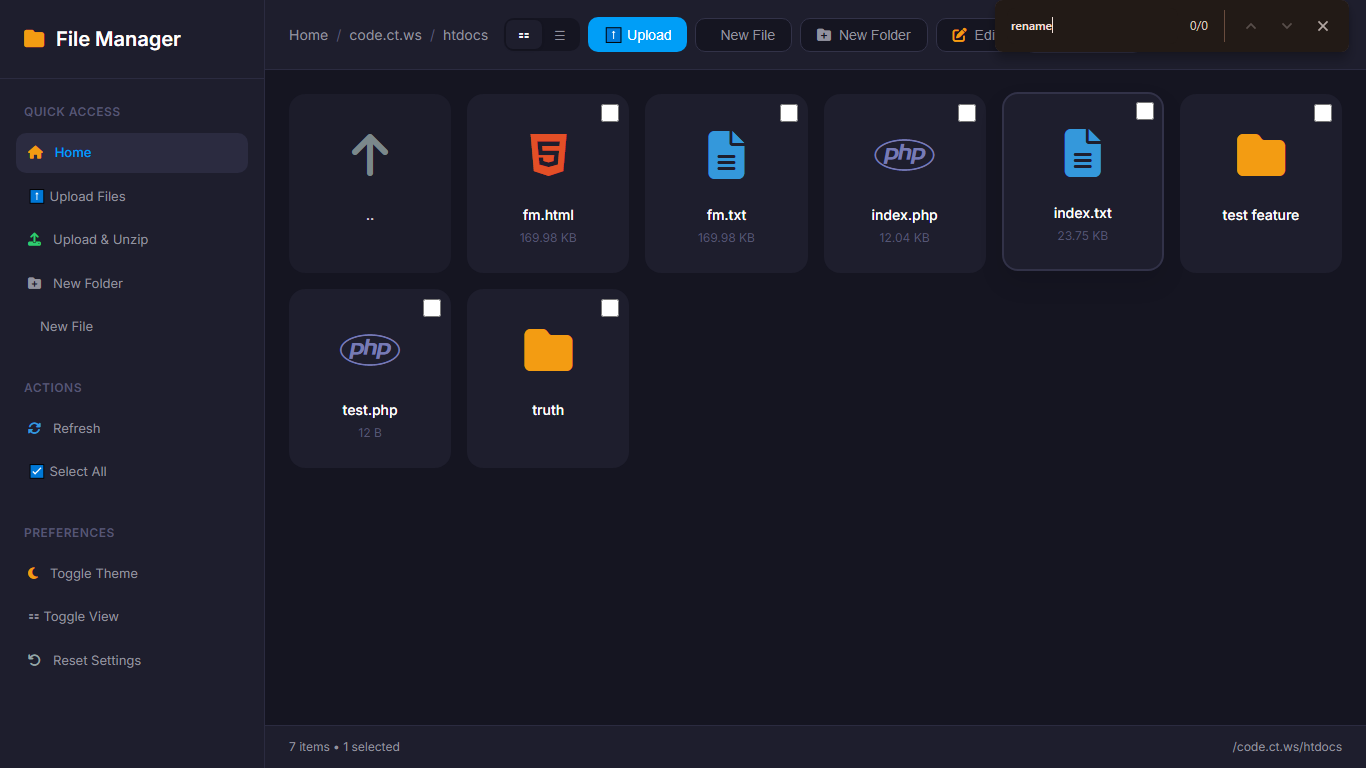

Huh, well spotted! That option does appear to be missing. It’s actually shocking that nobody appears to have noticed (or at least called it out) until now!
I’ll let iFastNet know so they can fix it.
6 Likes
inside the source code the ai does leave a function for that but it nowhere to be found, i can inject my own button or just use console menu to “press” the button, well if you can contact them, at least tell them to use human to make the damm thing, dont use ai
I will not do that, because I don’t agree with it. AI coding is not inherently bad, provided that you check and test what it creates.
And humans make mistakes too, I have also done design changes and refactors where I forgot to restore or re-implement certain functionality which I simply overlooked.
The file manager is somewhat crude, but if you’ve interacted with the control panel, you know that this attention to finer detail has never been iFastNet’s strong suit.
AI just enables you to do more things and do them faster. Whether that comes at the cost of quality is entirely up to you to decide.
3 Likes
Well in that case i hope that they does read the ai code and not blindly copy and paste, and hope that they make the code safe enough to not have any vulnerability or we will be cooked 
For frontend, yeah they can blindly copy and paste i will not complain (except if the design is so shit), but for backend, they better review the code 10 times before deploy
1 Like
This topic was automatically closed 7 days after the last reply. New replies are no longer allowed.