How to Make my website Faster

Well tbh I am desperate to make my site faster and it’s the exact opposite of what I want.
Well I know the basic culprits, I use Wordpress + Elementor + Astra (Theme) because that’s what I was advised to be a good combination but it was’nt really with keeping Free hosting on mind.

My homepage is about 71 MB which I know is EXTREMLY TERRIBLE and probably is the cause of this, but tbh I dont understand why because almost all the images on the page are hosted on externally (kind of a github CDN) and I have also used the image compressors and stuff possible on free hosts. Still I am not really able to understand why this is the case.

Moreover, Whats the best speed I can realistically get with the deadly combo of Wordpress + Elementor + Astra (Theme) because i am well aware it’s heavy, what’s realistically if I do a lot of Fixing (please suggest those) is it even possible to get instant loading on this combo
If not,
I am ready for suggestions like switch to what kind of combos Like switch to Pure HTML CSS?
Will that get me something? Or Any Suggestion Regarding the same is Appreciated.

Stick to WordPress default theme + default editor would be good enough.

As for the images they always count towards your homepage size regardless where you host them, even if you put it on GitHub I would recommend you to optimize them, like decrease the resolution and use more effective formats.

But is it possible to have / recreate current website design in what you said tho?

https://dikagg007.in/

I don’t see too many weird design so for most part you should be fine. You might have to give up on some flashy animations though, so expect a different design that serves a similar purpose rather than a 1:1 clone.

Well I have to do something fast coz I literally created a test page with a single page and got as bad result as the homepage. I gotta fix this fast

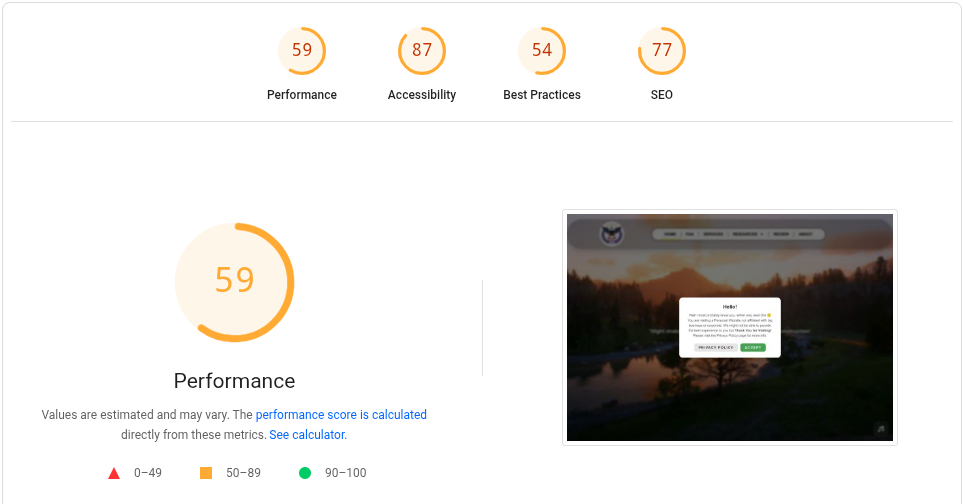
Hi! I suggest you start analyzing the performance of your website with actual data. You can start with Google’s PageSpeed Insights tool. You can view the results here.

If I were you, here’s what I would do. I would try minimizing the total number of render-blocking requests first. I would categorize them one by one based on importance and urgency. Some resources being requested on the homepage do not even need to be loaded right away and are not critical enough to break the website’s functionality. You need to “decide” which assets (i.e.: image, font, stylesheet, script) are needed during the initial page load and which of them are okay to be loaded afterward. Use the data gathered from Google PageSpeed Insights. By doing that, you can reduce the overall page loading time by 1–2 seconds.

Once I finished analyzing render-blocking requests, I would then proceed on implementing asynchronous loading techniques on the homepage. Here’s how:

  • For all assets
    • Preload
    • Prefetch
    • Preconnect
  • For images
    • Images must be loaded only when they are needed. They should be only loaded when they hit the viewport. If a visitor scrolls down to see the images of the projects you’ve made, then that’s the only time the images of the projects shall be loaded.
    • Implement proper lazy-loading using Javascript’s Intersection Observers functionality. Use a plugin if you don’t want to do it manually.
  • For stylesheets
    • Stylesheets that contain css animations, fonts, icons, etc are just extras. They can be loaded asynchronously in this manner: <link rel="preload" as=”style” href=”/link/to/stylesheet.css” onload=”this.rel=’stylesheet’”
  • For script files
    • Javascript files that do not break the essential functionality of the website are just extras. They can be either:
      • asynchronously loaded <script async src=”/link/to/script.js”>
      • deferred <script defer src=”/link/to/script.js”>
    • I strongly suggest that you should choose “defer” over “sync” to avoid problems in script execution order/sequence. Use a plugin if you’re afraid to break things.

I can see many aspects of the website that can be improved upon. If you don’t want to do these things manually, you need a plugin. Unfortunately, I cannot suggest the plugins that you need. It’s been years since the last time I used Wordpress. Plugins can even worsen the problem if not configured properly.

I think you’ve already flagged the most important culprits yourself.

Doing a speed test with Pingdom tells me a few things: Website Speed Test | Pingdom Tools


Firstly, the “wait” time for the actual page itself is 5.7 seconds. That’s a lot. That’s time time it takes for the PHP code on your website to execute. That could be due to Elementor or another plugin. A caching plugin can help with this.

Switching to static HTML would effectively eliminate this time. But you’re sacrificing a lot in ease of use, so you have to think about if that’s worth it for you.

As a middle ground, WordPress plugins like Simply Static exist. They can take your WordPress website and publish it as static HTML. If it works for you, then you almost have a best of both worlds situation, but that’s not guaranteed.


But a major factor is also the 56.5 MB of images used on the website. Many of them are served from GitHub Pages. You call this a CDN, even though it isn’t, while you could actually be using one.

My recommendations for this part are as follows:

  1. Use an image optimization plugin to reduce image sizes (compression and whatnot). I don’t have any specific recommendation for this one, I would suggest to just try a few and see which one you like.
  2. Pay attention to the resolution of your images and size them appropriately to their usage case. There are a ton of Full HD screenshots on your page, which are often only used as tiny cards and could probably have their resolution dropped by 80% or more without meaningful quality impact.
  3. Use an actual CDN. Like Cloudflare or Amazon Cloudfront. Don’t abuse static site hosting for it.
  4. You can use the plugin WP Offload Media to automatically upload your media library to object storage like Cloudflare R2 or Amazon S3. Both work perfectly with the CDN from the same company, and they have free tiers. This will be faster than GitHub Pages, and be easier to use since it’s all integrated into WordPress.

Well at the time I used github coz cloudflare couldn’t work on subdomains, and I personally thought that loading stuff from github is helping it, I wasn’t aware that wasn’t at all helpful.

I am definately gonna do what you said, but as I asked before is it worth my time because is it possible to make the site as fast as par with the paid hosting or almost near coz if it’s gonna make a small difference, i’d probably give up.

As you said, it’s not that I haven’t done anything to make it faster, I have used WP fastest chache plugin, also used more than one image optimizers and stuff (not simultaneously ofcource) Not used any particular html static type of plugins till now. But yeah I havent seen a slightest of difference which is quite observable in the stats.

I think of reuploding each image individually in Webp format and lowering their resolution manually since plugins have not yielded a worthy result. But again the question remains would it worthy of my time?

P.S I created a sample page with just a single image not CDN or anything and the loading time for that page itself is not really good https://dikagg007.in/abc/?i=1

I am loosing faith here tbh.

I appreciate your reply. I have used and got the same report from Google metrics and whatever you are saying is absolutely correct.

The major problem here is i am not a professional I did not code the entire website manually it’s all elementor and WordPress. I would love to do and fix whatever you said but the main question is HOW for someone like me with limited knowledge of what you said.

If your site doesn’t need interactive things like comments, you could go the Simply Static route that Admin suggested. The way I would recommend doing that is to back up your site, run it on your own computer using Local WP, and then export it to HTML using Simply Static (or another static site conversion WordPress plugin), and then upload the resulting static site to InfinityFree. That would make your site significantly faster, while still allowing you to build it using Elementor.

Considering the amount of images on your website, I would say so. It might not sound like a big difference, but if you do that to all of them it quickly adds up.

A few things worth untangling here.

First, it’s important to recognize that the slow PHP load time and the large image payload are two distinct problems. Fixing one doesn’t fix the other, and some solutions for one can even make the other worse. A caching plugin or Simply Static helps with PHP execution time. Image optimization and a real CDN help with the download size. You need to think about them separately.

On the PHP side, I’ll add a caveat to my earlier recommendations: the PageSpeed Insights result that @JavesPotato shared showed a First Contentful Paint of 3 seconds, which suggests the PHP processing time might not actually be as bad as Pingdom made it look. So focusing on the large images will probably see the most clear benefit to page load time.

Regarding the images, you said that the plugins didn’t work well for you. I don’t know if it is the result of plugins or manual images, but the images that are stored in WordPress itself seem to be very well optimized. For example, this screenshot was converted to webp and resized, and comes in under 150 KB:

Meanwhile this image on GitHub is 4.7 MB:

The difference is that the first image is in your WordPress media library, so the optimization plugin processed it. The second one is on GitHub, so the plugin never touched it. That’s why it might feel like the plugins aren’t doing anything. They are, just not to the images you moved off-site.

This is the core issue with using GitHub as a “CDN”. It was well intentioned, but it’s actively working against you. Your optimization plugins can’t reach those files, and GitHub Pages doesn’t set the same aggressive browser cache headers that our hosting does by default. So you’re losing on two fronts.

My suggestion: move the images back into your WordPress media library and let your optimization plugin do its job. Combined with the browser caching our servers already apply, that alone should give you a noticeable speed boost, without any additional tooling.

One thing a plugin can’t do for you is decide what resolution an image should be. If a Full HD screenshot is only ever shown as a small card, the plugin won’t know to drop the resolution. That’s a judgment call you have to make. There are probably plugins to do that, but you’ll still have to go through the images yourself and decide what resolution they should have. So yes, to your question about whether it’s worth the time: for the images that are used small, it is.

A proper CDN on top of that is still worthwhile, and I stand by the R2 plus Cloudflare recommendation. For Cloudflare’s CDN to work properly though, you’d need to put the R2 bucket on a custom domain, which might run into the same subdomain limitation you hit before. If that’s a blocker, Amazon S3 plus CloudFront is a good alternative. CloudFront gives you a default xxx.cloudfront.net hostname that works out of the box, no custom domain required, so you can just point WP Offload Media at it and be done.