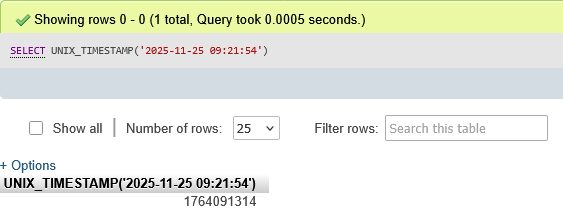
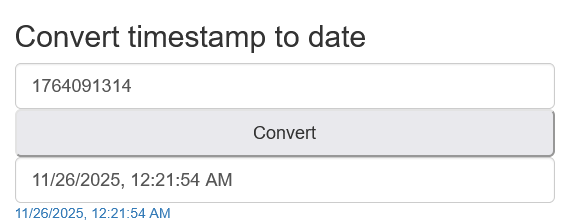
To convert the datetime string 2025-11-25 09:21:54 to the Unix timestamp 1764037314 using MariaDB/MySQL, use the UNIX_TIMESTAMP() function. This function returns the number of seconds since the Unix Epoch (‘1970-01-01 00:00:00’ UTC).
Direct Conversion Query
For a datetime string in standard MySQL format (YYYY-MM-DD HH:MM:SS), you can directly pass it to UNIX_TIMESTAMP():
SELECT UNIX_TIMESTAMP('2025-11-25 09:21:54');
This query will return 1764037314 if your server’s timezone is set to UTC+8 (or the equivalent timezone where this conversion is accurate). The server interprets the date as a value in the current time zone and converts it to an internal value in UTC.
Converting Non-Standard Formats
If your datetime string is in a non-standard format, you’ll need to use STR_TO_DATE() first to convert it to MySQL’s standard datetime format, then apply UNIX_TIMESTAMP():
It’s generally not recommended to generate timestamps from the database directly because it’s impossible for the database to use your time zone, thus the “wrong timestamp”.
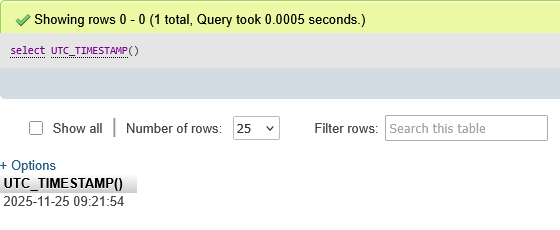
So is there any way to generate timestamps, other than the database? Besides, I see that SELECT UTC_TIMESTAMP() prints a datetime belonging to UTC0, so I think SELECT UNIX_TIMESTAMP( UTC_TIMESTAMP() ) simply outputs the corresponding timestamp value, and has nothing to do with the time zone!
In your last post you used UNIX_TIMESTAMP with a hardcoded time string. I suspect that this still have something to do with timezones, like the system may interpret that as a non UTC-0 time.
The issue is very much timezone related. Our servers are working correctly, but the UNIX_TIMESTAMP function works differently than you think it does.
You need to realize that our servers are configured to be in the EST (UTC-5) timezone (historic reasons).
The UTC_TIMESTAMP() function returns a date and time. But as you can see, it does NOT include a timezone identifier. But Unix timestamps are always in UTC, but other dates and times may not be. So the UNIX_TIMESTAMP() function converts the time from the configured time zone (EST) to UTC, and uses that for the timestamp.
So UNIX_TIMESTAMP assumes the input value is in EST, but you’re giving it a UTC time, so of course the result will be wrong.
If you want to get the current date and time, you can use the NOW() function. But be aware that this time will always be in EST.
If you want to get the current timestamp, you can either run UNIX_TIMESTAMP(NOW()), or just UNIX_TIMESTAMP().
If you already have dates and times in UTC you need to work with, you will need to find another way to convert them into timestamps. I don’t think MySQL can do this for you, but PHP can.
According to what you said: “You need to realize that our servers are configured to be in the EST (UTC-5) timezone (historic reasons).”, it seems the query SELECT UNIX_TIMESTAMP( UTC_TIMESTAMP() )
will print a timestamp based on the EST timezone, regardless of the argument.
And if I understand correctly; then, the query should be: SELECT UNIX_TIMESTAMP( CONVERT_TZ( UTC_TIMESTAMP(), '+00:00', @@session.time_zone ) )
and the printed timestamp will be based on the UTC0 timezone.
In your opinion, how should I understand and adjust this, in case I misunderstood?
If you want the database server to produce the current Unix timestamp, just run UNIX_TIMESTAMP(), without any input arguments. That will give you the current time.
A Unix timestamp is the number of seconds since 1970-01-01 00:00:00 UTC. There is no shifting for timezones, it’s a universal value.
The only justification for adding the additional UTC/EST conversions is if you’re dealing with existing timestamps in a database which you want to convert. But if you really just want to get the current time, you’re vastly overcomplicating the issue.
Is there harm in having that more complex code anyways? It turns out: yes there is! As the documentation points out:
If you use UNIX_TIMESTAMP() and FROM_UNIXTIME() to convert between values in a non-UTC time zone and Unix timestamp values, the conversion is lossy because the mapping is not one-to-one in both directions. For example, due to conventions for local time zone changes such as Daylight Saving Time (DST), it is possible for UNIX_TIMESTAMP() to map two values that are distinct in a non-UTC time zone to the same Unix timestamp value. FROM_UNIXTIME() maps that value back to only one of the original values.
It’s probably safe since the servers are configured for a fixed timezone so no need to worry about DST here, but it might bite you if you ever try to run this code on a server in a different timezone.
And why run the risk when it can be avoided so easily?
servers are configured to be in the EST (UTC-5) timezone
so I thought that UNIX_TIMESTAMP() would return timestamp according to the EST timezone. Besides, this is my first time working with time, so there is a bit of confusion, mistakes and many questions that I don’t know.
I checked again and it is true that the value is the same, between my method and the method you instructed.
Thanks for patiently explaining and guiding newbies like me!