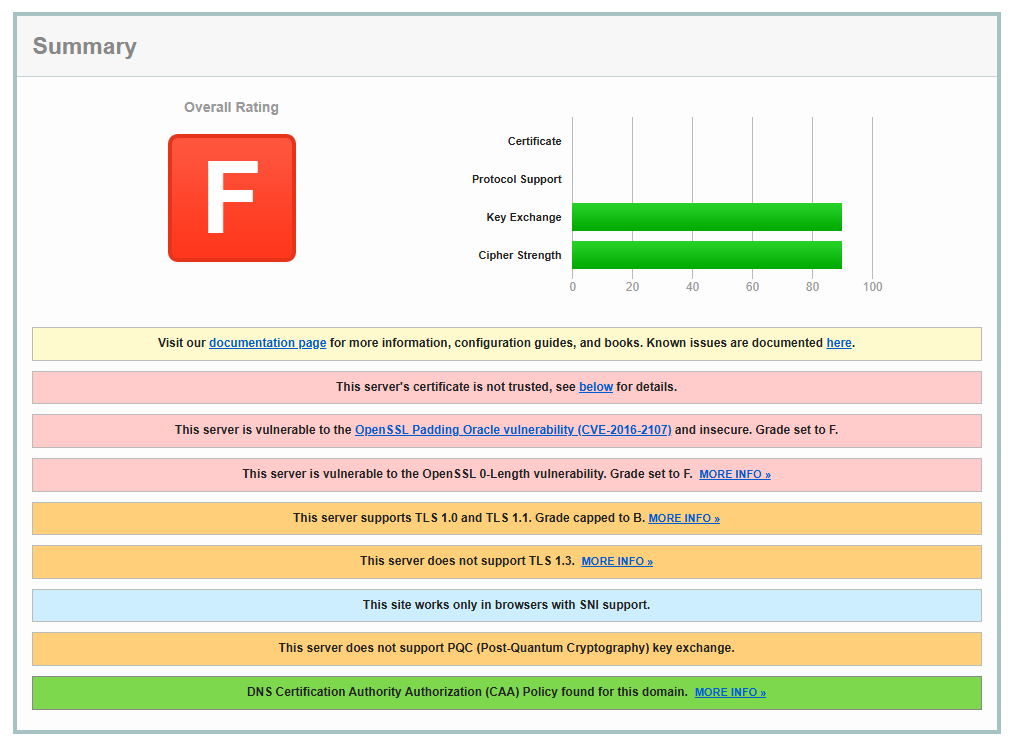
DNS lookups return 185.27.134.24, and Check-Host reports HTTP 200 from most locations. The website and WordPress admin have worked over HTTPS on my mobile device, but desktop access is inconsistent.
Could you please verify the SSL certificate being served for this subdomain and check whether the default free-subdomain certificate is being deployed correctly?
DNS lookups return 185.27.134.24, and Check-Host reports HTTP 200 from most locations. The website and WordPress admin have worked over HTTPS on my mobile device, but desktop access is inconsistent.
Welcome to the InfinityFree community forum! Good to have you here.
Most people answering here are volunteers. They’re often the fastest source of help. Admin (the only staff member) checks in about once a day for issues on our end.
Volunteers can’t see your account or website. Share what you actually see, like error messages and what happens when you try something. That’s more useful than your theory of what’s wrong.
AI tools often get InfinityFree wrong. If a volunteer’s advice differs from what an AI told you, please try the volunteer’s suggestion first.
Solving an issue is a joint effort. Try the suggestions you get and report back what happened.
Beep boop, I’m a bot! I dug through the forum to get you started. I sometimes get things wrong though, so do with this what you will until a human has a look.
Could you open the certificate details on the desktop (click “Not secure” or the padlock, then view the certificate) and tell me three things: who it was issued to, who issued it, and its valid-from and valid-to dates? Without those I can’t tell whether the expired certificate is one served for meeem.kesug.com or a different one.
I’d also like to know the IP address your desktop gets for the site. The account’s website IP in your post ends in .34, but the DNS lookups you quote end in .24. If that’s a typo, ignore it. If your desktop really resolves to .24, the mismatch matters. Running nslookup meeem.kesug.com on the desktop will show it.
Since it works on your phone, it would also help to know whether the desktop fails on another network, such as your phone’s hotspot.
Your website is working fine from here. And seeing how the domain was, by your own post, created today, I’m 99% certain that what you’re experiencing is just DNS caching, and your website will start working automatically within a few days at most.