Beep boop, I’m a bot! I dug through the forum to get you started. I sometimes get things wrong though, so do with this what you will until a human has a look.
Two quick things would narrow this down. Does the site also time out on a different network, such as mobile data instead of your home Wi-Fi? And what IP address does optimatiz.xo.je resolve to when you run nslookup optimatiz.xo.je on your computer?
Your account is active, and the website IP in the control panel is 185.27.134.213. If the address your computer gets is different, the problem is in how the name resolves. If it matches and the site times out from every network, the problem is on the server side. Those are different problems with different fixes, and the timeout message on its own can’t tell them apart.
Please also say whether the file manager fails with the same timeout, or gives a different error. If it gives a different one, post the exact text.
Checking the domain, I can’t access it either. I get a timeout error.
But it is resolving to 185.27.134.213, which Lemni says is the correct IP (good start)
My advice would be to use filezilla (or another FTP client) to backup your current site (obviously, if its important to you, you should already have a backup, but I’m not going to assume anything), and replace the home page (the index.php) with a simple test page.
Then clear your browser cache and see if you can view the page. If you can, that means that its your page’s code that’s causing the issue
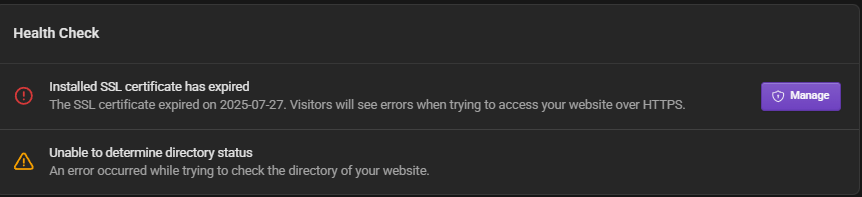
The red one is because I don’t use infinity freeze SSL anymore on my site the unable to confirm directory status is the important one for this error.
Given the fact that you’re not able to access the file manager and you’ve got that error that would suggest there’s a backend problem which admin will need to look into or get iFastNet to look into