MySQL Password: I am definitely using my vPanel password (copy-pasted to avoid typos).
I have verified in vPanel > MySQL Databases that the user if0_40235695 has “ALL PRIVILEGES” on the database if0_40235695_test_resq.
Minimal Test Also Fails: I created a very simple PHP script (test_db.php) containing only the basic PDO connection code with the same credentials hardcoded. This script also fails with the exact same error (Access denied @ ‘192.168.0.42’). This suggests the problem is not with my main application code.
Abnormal IP Address: The strangest part is the IP address 192.168.0.42 in the error message. This is a local IP address. My PHP script is hosted on your servers (/home/vol10_4/infinityfree.com/if0_40235695/htdocs/), so why does the MySQL server see the connection as coming from a local IP? (I’ve also asked a friend to try and use the same URL, he got the SAME EXACT MESSAGE and same IP)
Question: Could you please check if there is a network configuration or routing issue between the PHP web servers and the MySQL server sql308. infinityfree. com that might be causing this behavior? Or is there another specific InfinityFree configuration I should use for the MySQL connection from PHP?
As of this issue, this is because free hosting database servers use local IP addresses. Having hostnames for database servers doesn’t not mean they have to resolve to public IP addresses.
Next time please don’t use AI to write posts as this only clutters up your inquiry and makes it harder for people to understand.
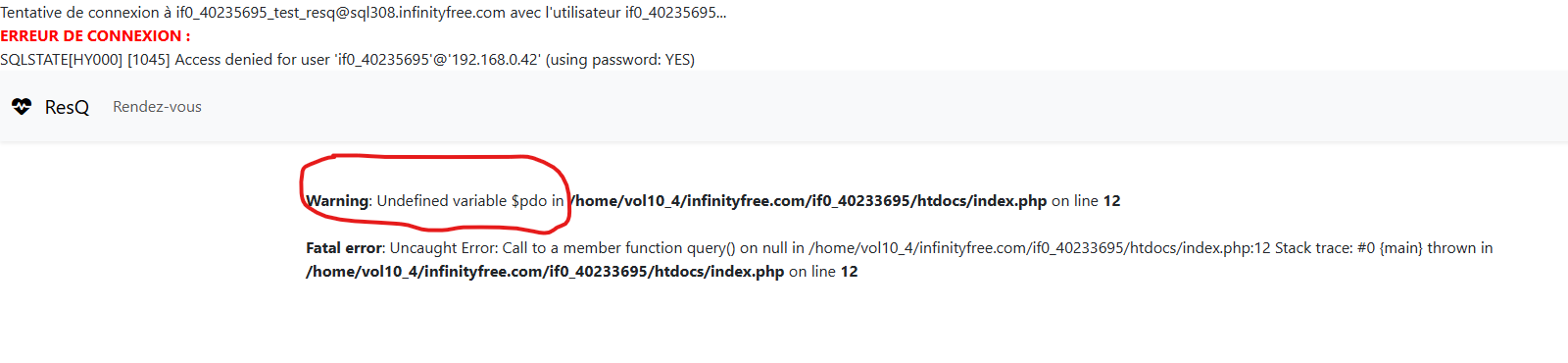
I quoted this part because this is strong proof that you probably just used AI without actually checking.
Free hosting doesn’t have privilege controls. There’s 0 possibility that you could have done this.
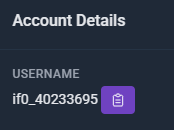
Please check again. This is not the username of your account.
Interesting, because your user doesn’t have ALL PRIVILEGES, and there is no way to verify that.
Please don’t use AI to fluff up your posts. It will add things that are false, and write that checks have been performed that you didn’t actually do. That means you’re giving us false information. And we cannot help you effectively if you mislead us with incorrect information about the issue.
Our database servers are not connected to the public internet, they are access only through an internal network that our web servers are also connected to.
In other words: this is how our system is setup, what you’re seeing is completely normal, and it’s not the reason your database connection is not working.
The error you’re seeing says “Access denied”. It means that PHP is able to reach the database server and attempt to login, but the login is rejected for the thing you’re trying to access. This cannot be a network issue. This error message proves that you can connect, which means the network is fine.
Yes i’ve understood my mistake about the AI part but it was the only way I found to make it understandable, my explanations are always giberrish and uncomprehensible to others
On the other hand, the username I have been given is this :
I dont know where else I should’ve found the “working” username but to me it seemed like the right one $host = 'sql308.infinityfree.com'; $dbname = 'if0_40233695_test_resq'; $user = 'if0_40233695';
For the IP address part, now I understand why it show me this and I feel pretty stupid thinking about it
I’ve checked around 30 times that the username was right, the database name too and even changed the password to check that it wasnt a wrongdoing of mine but its still showing that error code
That’s a good reason to use AI. However, please do check what it has actually written before posting, so you can correct any factual inaccuracies it may have invented itself.
The username in the screenshot is correct. But the username in your initial error message, as well as the error message currently on your website is not the same.
The error message shows a username with the number 2356, but it should be 2336.
I’ve ran through the file dozens of times to make sure the username was the right one and i’ve identified a weird problem, the username in the files and database is the same but the error message talks about an unknown user that isnt used in ANY of the files
Even though this project isnt going to be used as is anymore, I’d still like it to work to make sure that I understand how InfinityFree works and to use it for future projets
I’m so confused, I didnt modify any of the code since the last time i’ve touched it and abandonned for it not working but now it works, maybe there was a server reboot which debugged it i’m unsure but allelujah it finally works :’)