Hello InfinityFree team,
My domain gestionmarchi.com has been flagged by Google as a deceptive site / social engineering, and I’m trying to remove the cause so I can request a successful review.
What is happening
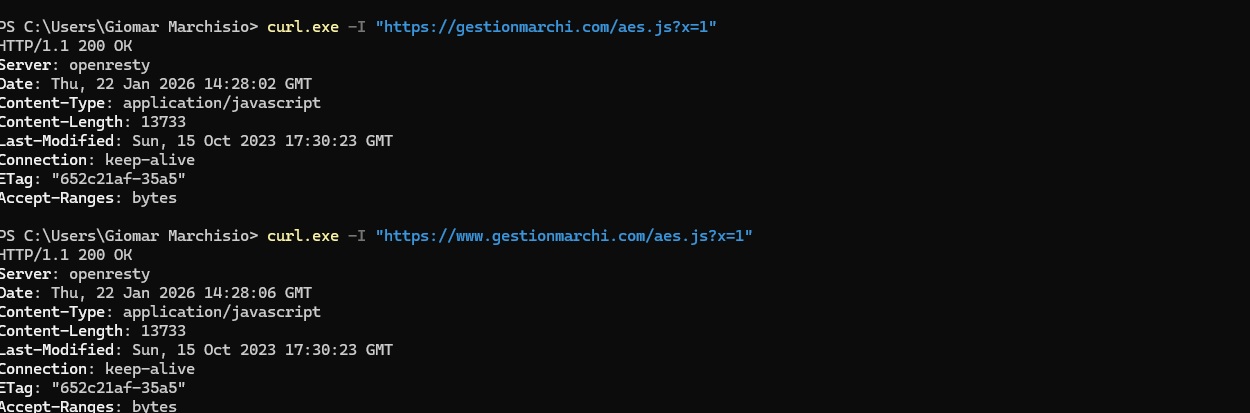
When I request the homepage directly from the origin server (without Cloudflare proxy), the server returns an HTML/JS challenge that loads /aes.js, sets a cookie called __test, and redirects to /?i=1. The response header shows Server: openresty.
This content is NOT part of my website project (I searched my project files and there is no aes.js, slowAES, __test, toNumbers, etc.). It looks like an injection or server-level rule.
Evidence (curl output)
HTTP (port 80)
HTTP/1.1 200 OK
Server: openresty
Content-Type: text/html
HTTPS (port 443)
curl.exe -vk --http1.1 -A “Mozilla/5.0” “https://gestionmarchi.com/”
HTTP/1.1 200 OK
Server: openresty
Content-Type: text/html
Also, requesting /__test returns Cloudflare-style errors (520) when proxied, and origin responses are inconsistent, which made me suspect proxy/origin security behavior.
What I already tried
-
I checked my website files and
aes.jsdoes not exist in my project. -
I downloaded the full account files as a ZIP and searched for:
aes.js,slowAES,__test,toNumbers,auto_prepend_file, etc. → no matches
-
Cloudflare was previously Proxied and returned 520; I switched DNS records to DNS only (grey cloud) to troubleshoot origin directly.
Request / What I need help with
Could you please:
-
Confirm if InfinityFree adds any OpenResty/Nginx security challenge that injects
/aes.js+__testcookie, and if so, how can it be disabled for my domain? -
If this is NOT expected behavior, can you check whether my hosting account or domain is affected by:
-
server-level injected rules,
-
compromised account,
-
malware / hidden scripts outside
htdocs, -
PHP
auto_prepend_file/.user.inibehavior, -
or anything in OpenResty/WAF that could be forcing this response?
-
-
Provide the exact steps I should follow to fully clean this so Google Safe Browsing review will pass.
I’m happy to provide any additional info you need (account username, hosting details, etc.).
Thank you for your help — this is urgent because the domain reputation is impacted.
Best regards,
Giomar Marchisio