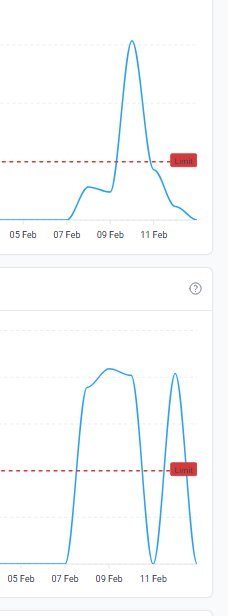
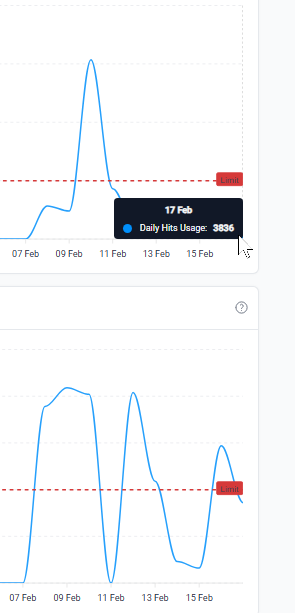
Your account was suspended because you hit the CPU limits.
Other Information
All I did was to put in a dice roller app that should in theory allow different users in different browsers to share the same session and see each other’s rolls. This is useful for playing games via email.
I don’t know why it is apparently using up server cpu resources, it should be using local cpu and only hits to save rolls to a txt file.
Where can I find logs/info to know what is actually using up these resources please?
Not really, the statistic shows very low hits. Like 3k out of 50k, but it slammed from 0 to 160k cpu limit surprisingly quickly. The app only uses two hits per roll - one to save, one to read.
Maybe it’s not this app but something else.
So I need to know what is using CPU limits. What file.
Ultimately there are no logs, and no way for us to be 100% sure.
Everything the site does uses CPU load. You can minimise that by doing some stuff in JavaScript, which does run on the clients pc, but ultimately there’s still CPU usage.
If I had to guess from the information you’ve provided it sounds like your polling the server.
Given you’ve said it allows users to share live sessions, every time a user session checks for updates from other users that’s going to use CPU load. If you do that two or three times a second that will add up quickly.
If your script is checking for update depending how you’ve done it it may not produce many hits while still producing a spike in CPU load
There is no way to know. On free hosting, we just aggregate the total CPU usage per account per day. We don’t store more granular data than that.
Premium hosting is a bit better in that regard, but don’t expect miracles. The CPU usage is still aggregated per hour, and the only thing you get along with that are resource “snapshots” which tell you which processes were active. If you see that a lot of web processes were active, you can then compare that with your website’s access logs (also not available on free hosting, but it is on premium hosting) to try and make some guesses as to what requests are causing the high CPU load. But even that won’t tell you what code specifically caused the high CPU usage.
What you are probably looking for is tracing and profiling, but that has additional cost and performance impact and is typically not included with any hosting.
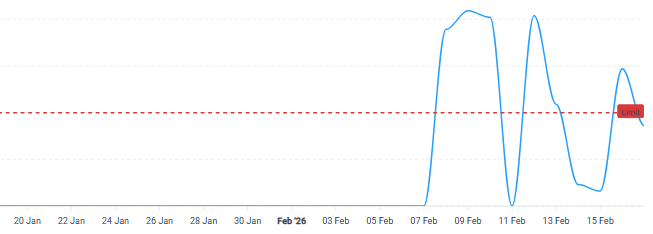
You’re not wrong, but it is good to mention that your account was suspended for high CPU usage on the 9th and the 10th as well, and you had much higher hits usage on those days.
Thank you! This is such a mystery though, because I was the only one testing it.
I understand those early high access rates because I was running multiple tabs on this to check if different tabs can access the same data.
So if it is not hits, and javascript uses local cpu for animation and audio… ???
The last one on 12 Feb was even just with only a single tab open. I wrote this thing, so I’m sure there’s no malware. I’ll try to debug for one more day and it might get shut down again.
[edit]
How often does free hosting refresh its metrics, please?
I checked it on my own Super Premium account and it’s not there. Do you have a premium account with iFastNet that does have this feature? If so, would you mind sharing which plan and which server you are on?
Yeah I’m going to have to pay for Premium at some point to figure it out, but for the past few days the only web app I have open is Filester File Manager on Wordpress.
Or this graph is not actually accurate, because while it says the CPU limit went over 100%, it didn’t actually shut down the site. Does it only trigger on 200%?
So the file manager being active in addition to the dice-rolling script might have caused the spike. So maybe it’s better to avoid having file managers open for hours if you’re not going to be doing anything.