My WordPress sitemap returns 404 on InfinityFree hosting. Google Search Console reports “Sitemap could not be read” and “General HTTP error.” The WordPress Site Health REST API test also returns 403 Forbidden. Please help me identify the cause.
WordPress Site Health also reports a 403 Forbidden error for a REST API test. I have already changed Permalinks to “Post name” and saved the settings. My .htaccess file contains the standard WordPress rewrite rules.
Could you please check whether a hosting security rule or server configuration is causing this issue?
Welcome to the InfinityFree community forum! Good to have you here.
Most people answering here are volunteers. They’re often the fastest source of help. Admin (the only staff member) checks in about once a day for issues on our end.
Volunteers can’t see your account or website. Share what you actually see, like error messages and what happens when you try something. That’s more useful than your theory of what’s wrong.
AI tools often get InfinityFree wrong. If a volunteer’s advice differs from what an AI told you, please try the volunteer’s suggestion first.
Solving an issue is a joint effort. Try the suggestions you get and report back what happened.
Beep boop, I’m a bot! I dug through the forum to get you started. I sometimes get things wrong though, so do with this what you will until a human has a look.
The 403 on the REST API test is expected on free hosting, and it’s separate from the sitemap problem. Our security system only lets through visitors that can run JavaScript and keep cookies. WordPress can’t pass that check when it tests its own site, so Site Health reports “The REST API encountered an unexpected result”. The article says this doesn’t mean the REST API is broken, and that it works normally for your visitors.
The 404 on the sitemap isn’t explained by that. Our browser security article says Google’s crawler is exempt from the check, so a security rule blocking it would not normally give a 404. Google’s live test in Search Console isn’t exempt, so don’t rely on it.
When you open https://englishlearnwithsagar.kesug.com/blog/wp-sitemap.xml in a normal browser window, do you get WordPress’s 404 page, a plain server 404, or the XML? And where is the .htaccess file with the WordPress rules: in the /blog/ folder next to wp-config.php, or in htdocs? That tells us whether the request reaches WordPress at all.
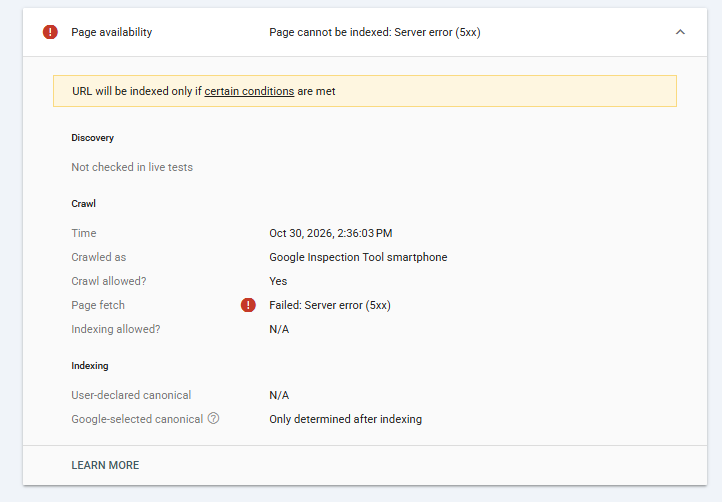
I performed another Google Search Console Live URL Test.
The results are:
Crawl allowed: Yes
Crawled as: Google Inspection Tool smartphone
Page fetch: Failed: Server error (5xx)
Indexing allowed: N/A
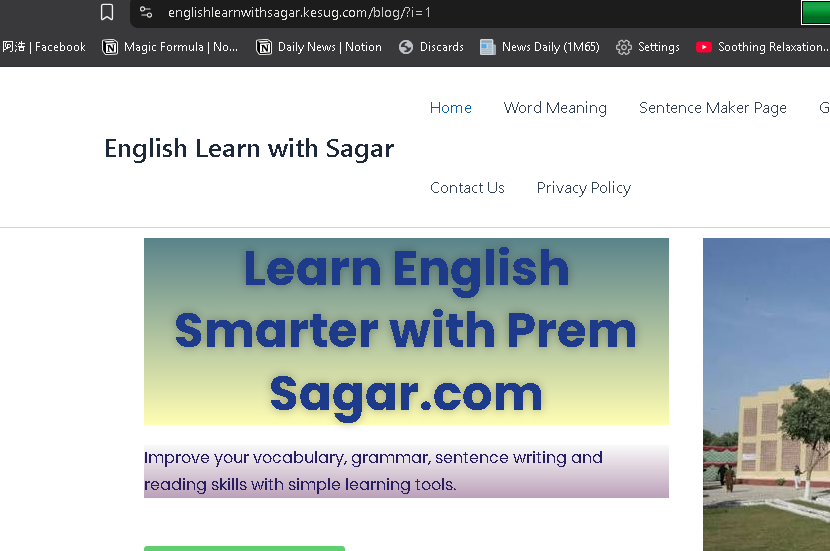
My website opens normally in my browser, but Google’s inspection tool receives a 5xx server error.
Could you please check the server logs for my domain and investigate why this request is returning a 5xx error? Could a hosting security rule be affecting Google’s inspection tool?
I have attached the latest Google Search Console screenshot.
Both return 404. Could you please confirm whether WordPress sitemap URLs are supported on InfinityFree, or suggest another way to make my sitemap accessible to Google Search Console?
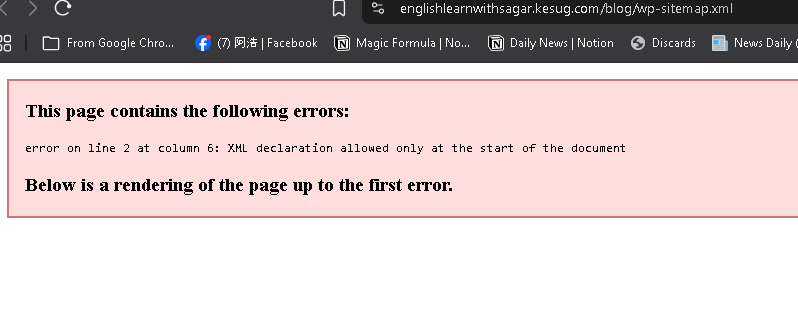
Thank you. I also tested the sitemap URL and received this XML parsing error:
“error on line 2 at column 6: XML declaration allowed only at the start of the document”
This suggests that some extra output may be appearing before the XML declaration. Could you advise how I can identify whether this is caused by WordPress, a plugin, or the hosting environment?
Thank you for the explanation. I currently have Elementor, Elementor Pro, and Akismet installed, and I am using the Astra theme. Could you please suggest a safe way to identify which plugin or theme is adding the unexpected output before the XML declaration, without affecting my live website?
Thank you. I understand that a plugin or theme may be adding unexpected output before the XML declaration.
Could you please guide me on how to safely identify the responsible plugin or theme on my live WordPress website without affecting visitors or breaking the website?
The source contains the InfinityFree 404 page HTML, including:
<title>404 Not Found - InfinityFree</title>
It does not appear to contain the WordPress sitemap XML.
Could you please clarify why this URL returns the InfinityFree 404 page instead of reaching WordPress? Is this related to URL rewriting or hosting configuration?
That URL returns the sitemap for me, just faulty. I’m not sure why are you seeing a 404 page.
There aren’t really any “safe” way to determine the issue if you don’t understand code. The solution is to deactivate everything, switch back to the default theme, and reactivating your plugins one by one to see which one caused the sitemap to break.
Thank you for the explanation. My website is live and uses Elementor and Elementor Pro. Deactivating all plugins and switching themes may affect the website design. Is there a way to perform this troubleshooting on a temporary copy or staging website instead?
Sure, that’s an option. You could copy the website to another location where you can safely tinker with it. You could either do that on a local development server like XAMPP, or by just adding an extra subdomain to your account and copying the files there.
If you are going to test on our hosting, make sure to copy the files, copy the database, AND update the configuration of the debug copy to point to the testing database. Both the staging site and the live site will work fine if you do only half of those steps, until you start making changes on the testing site and breaking your live site in the process.
One more thing to note: Elementor Pro is paid software, so you need to buy a license from Elementor to use it. I have no way to check if you did, but usually when people use free hosting, they’re not paying for their website software either.
So if you got Elementor Pro from “somewhere else”, be aware that that may be an illegally modified copy, and that pirated software often doesn’t just contain license circumvention, but malware too.
And a malicious, pirated WordPress plugin that has a small error in the code could definitely cause unexpected behavior in your website.
You keep saying that it returns a 404 page, but so far nobody has been able to reproduce that. Everyone just sees the (broken) sitemap page. I don’t see a 404 page either.
If you do still see a 404 error page, then that must be caused by browser cache. Please try checking the URL in Incognito Mode and see if you still see the 404 page there.