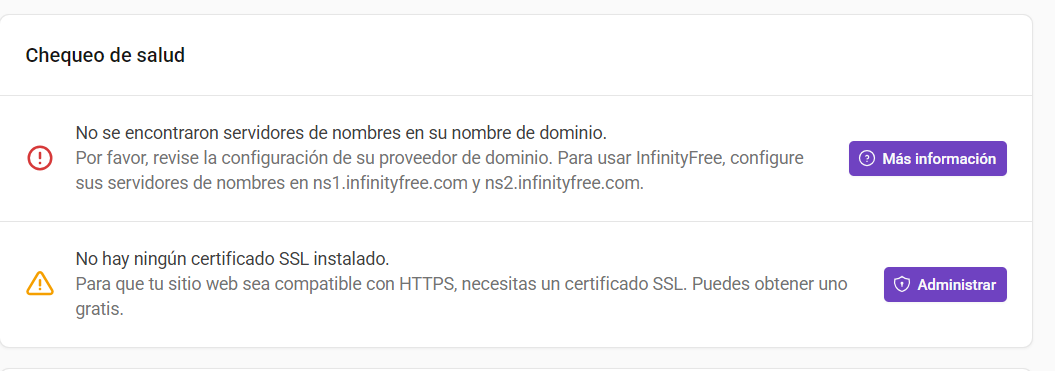
No nameservers were found on your domain name
Please check the settings at your domain provider. To use InfinityFree, set your nameservers to ns1.infinityfree.com and ns2.infinityfree.com.
Other Information
I see this message, but when I check the management tools, it actually appears to be set up correctly. Besides, the site opens at isemprendapp.site, so the domain is connected.
Welcome to the InfinityFree community forum! Good to have you here.
Most people answering here are volunteers. They’re often the fastest source of help. Admin (the only staff member) checks in about once a day for issues on our end.
Volunteers can’t see your account or website. Share what you actually see, like error messages and what happens when you try something. That’s more useful than your theory of what’s wrong.
AI tools often get InfinityFree wrong. If a volunteer’s advice differs from what an AI told you, please try the volunteer’s suggestion first.
Solving an issue is a joint effort. Try the suggestions you get and report back what happened.
Beep boop, I’m a bot! I dug through the forum to get you started. I sometimes get things wrong though, so do with this what you will until a human has a look.
Where exactly do you see “No nameservers were found”? Is it on a page in the members area, such as the domain’s Health Check, or in the browser when you open the site? And what does the Health Check for isemprendapp.site say, word for word?
Your domain was added to your hosting account only a few hours before you posted. The article below says a new domain can take up to 72 hours to work everywhere, and different DNS servers can give different answers during that time. So the site opening for you doesn’t prove the nameserver check elsewhere will agree. It could just be a stale answer that clears by itself, but I can’t tell that from here.
The article also says the Health Check shows whether your domain has nameservers and whether they point to InfinityFree. It says the 72 hours only start counting once the settings are correct.
To check whether the problem is the domain or just your connection, enter the domain on dnschecker.org with record type A. The article below explains how to read the result. If every location fails, the domain setup is the problem. If only some fail, it’s probably still spreading.
If you can tell me which of those you see, and which nameservers your registrar currently lists, that should narrow it down.
I just checked this and it was caused by an issue in the members area where it failed to correctly query the DNS of your domain. That issue has been fixed now, and you should now be able to request a new certificate.