lol monsta is gone now
6 Likes
Todays update to yesterday’s update is even worse. Can you add it back that when you click on a variable/tag etc it would highlight all other instances of that variable.
The UI looks nicer, but there is a problem with the syntax highlighting after php:
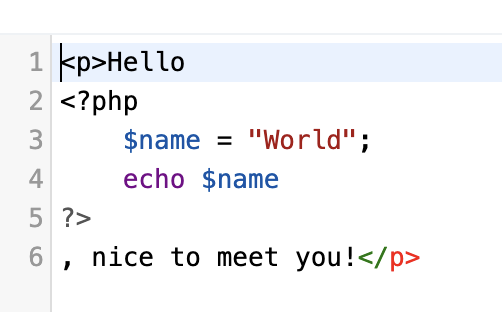
There is also no way to auto save and change the name when in the icon view. If these, and any other, issues could be fixed, it will be a good update.
is the code not broken, your missing a ; after the echo name.
1 Like
at the top of the file manager, there is a ‘search files’ option !
I want to search within a file for variables etc. The search function is not there when you open a file. Before you could just press ctrl-f and it would appear. For some strange reason you can’t even use inbuilt find function in Chrome. So currently no way to search inside a file.
Really wonderful however file saving feature is permanent.
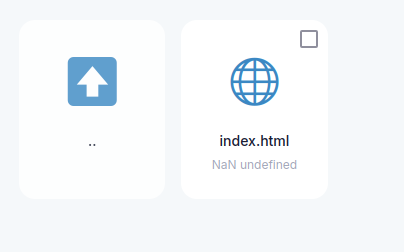
If iFastNet’s going to keep this new style (which is better), ask them to (ask AI to use) Font Awesome.
<link rel="stylesheet" href="https://cdnjs.cloudflare.com/ajax/libs/font-awesome/6.0.0-beta3/css/all.min.css">
That way, they can keep the “Emoji Icons” while also ensuring theme & system compatibility.
This seems to happen when the file is 0B. They need to add a check for file size, or change the checks.
I am missing it, but when you add the ; it still has funny colors
I noticed that too… it didnt come from iFastNet at all 
The command “ctrl + F “ doesn’t work in this new File Manager. I want to search some terms in my file.
1 Like
Theres the bug when creating a new index,html, it creates index.php automatically
It’s terrible changes for rookies like me!
- There´s no search;
- That files tags to close the blocks is gone;
- The auto-complete doesn’t work;
- Scheme of colors? nothing;
These are little things that helps a lot the rookies and sometimes make the task so difficult! Please put it back.
3 Likes
Great work on the updates today. The new in-file find system and the option to save and stay on the page are really helpful. Thanks for putting them in so fast.
Is it possible to have the find system have an up/down button(s) so you can find the next previous instance?
Hopefully you can find a way to bring back the variable dropdown where it auto suggests variable names used previously.
looks like more updates have been put in 
1 Like
Another really cool feature that would be awesome if you can add in is when you highlight text (e.g a variable) that all other instances of that variable get highlighted too.
1 Like
Thanks again everyone for the feedback!
As you can all see, some major changes were made were to the UI, addressing many of the issues reported here have been addressed.
Please do keep sharing issues or requests you have for the file manager!
Specifically regarding the file editor: please note that the file editor is not custom, it uses an off-the-shelf library (CodeMirror - used by many other products and companies). We’re limited to the functionality offered by the editor software. And please realize that it’s a basic file editor, not a full IDE. It’s main use is for quick edits, for major software changes I strongly recommend developing the software on your own computer.
Regarding some of the more recent posts.
I just check it and it seems that this is the case already?
I’m not sure, I think this functionality is provided by the editor library, which makes it hard to change. On desktop, I was able to find the next and previous items by hitting Enter (for next) and Shift+Enter (for previous), but I’m not sure how it works on mobile.
What search is missing? There is both the ability to search files and folders using the search bar at the top, and the editor window has the ability to search inside files.
I don’t know what you mean by this.
It seems to be working for me now.
No idea what you mean by this. Theming seems to be working correctly from here.
That doesn’t seem related to the file manager. Can you provide reproduction steps for this?
Hitting Ctrl+F opens the search bar of the editor itself, allowing you to search inside files. Unlike, say, this forum, hitting Ctrl+F twice doesn’t open the browser search, but I’m guessing that’s a limitation of the editor library.
5 Likes
La verdad soy Usuario de habla española, estabvercion de files manager es la menos funcional, que las otras, es menos intuitiva, estaba mejor la que tenía iconos abajo, yo trabajo con el teléfono estoy haciendo algunas prácticas para después ya comprar y lo hago a trabajar vez de Android, espero no lo tomen a mal, pero creo que está Versión en la menos funcional ,gracias
Hello, and Welcome to the InfinityFree Forum @Orbytes!
This is an English-speaking forum, please post in English. It’s okay to use a translator.
The truth I am Spanish-speaking user, file manager’s check-in is the least functional, that the others, is less intuitive, I was better than I had icons down, I work with the phone I am doing some practices to then buy and I do it to work instead of Android, I hope they don’t take it bad, but I think it’s Version in the least functional, thank you
2 Likes