Welcome to the InfinityFree community forum! Good to have you here.
Most people answering here are volunteers. They’re often the fastest source of help. Admin (the only staff member) checks in about once a day for issues on our end.
Volunteers can’t see your account or website. Share what you actually see, like error messages and what happens when you try something. That’s more useful than your theory of what’s wrong.
AI tools often get InfinityFree wrong. If a volunteer’s advice differs from what an AI told you, please try the volunteer’s suggestion first.
Solving an issue is a joint effort. Try the suggestions you get and report back what happened.
Beep boop, I’m a bot! I dug through the forum to get you started. I sometimes get things wrong though, so do with this what you will until a human has a look.
Error Message: I’m having trouble updating plugins and themes, and also updating my WordPress version, because it asks for the FTP username and password. I copied them from the control panel, but it gives an error.
Other Information: I copied the username and password from the control panel, but the connection to the server still fails.
What is the exact text of the error WordPress shows after you enter the FTP details? And what did you put in the hostname field of that form? Those two things would show whether the details are wrong or something else is failing.
I couldn’t find anything on the forum about this specific FTP prompt, so I can’t say why it fails for you. I did find two things that relate to updating WordPress here.
This thread says not to update WordPress itself from the dashboard, because it often breaks the site. Its instructions are in screenshots, so I can’t quote them.
This knowledge base article says installing or updating plugins and themes from the admin area can fail on larger ones. It explains how to upload them by hand with FTP instead.
Having WordPress upload its own files through FTP will not work. But the real sign of trouble is that WordPress is trying to do that in the first place: it means that WordPress is unable to write the files directly, and that’s an issue that should (and can) be addressed.
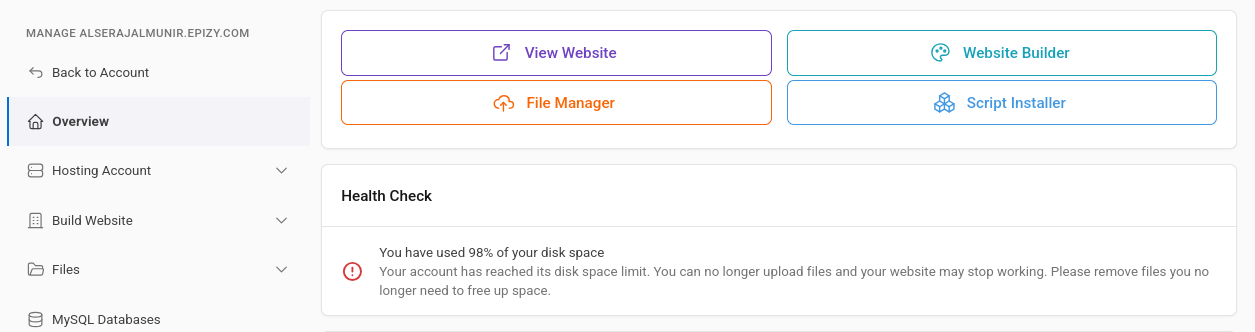
In many cases, that issue means that you’ve either run out of disk space or run out of inodes. And a quick check in the client area shows the answer: