So, I decided to update my three different Windows profiles so that I can easily tell which one is which… I forgot that because the main profile is connected to an Outlook account, updating the profile picture on Windows will update it everywhere… Didn’t mean to have the koala photo appear everywhere in all Microslop apps, but I guess my profile picture will forever be a koala until I change it again.
Purchased myself a “Car Bluetooth Kit” which really is just a Bluetooth dongle and a AUX connecter. Charged it up. Gave it a test, it works with my large speakers. Hooray!
Then Jake pointed out the fact I could use the dongle with my wired earbuds so that I can still use them while being detached from the phone, so that’s a bonus!
Technically, I’m using the device for its intended purpose, even though it doesn’t look like it.
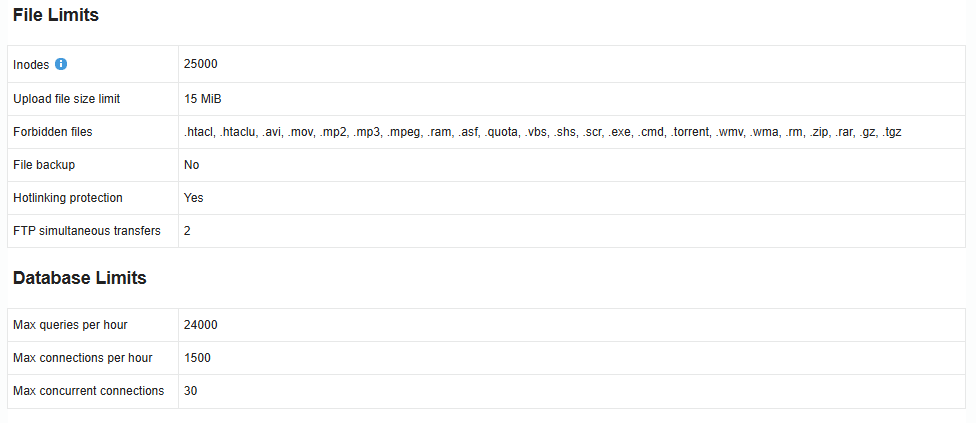
I gave another Free Host a shot (it wasn’t an iFastNet one)… There’s some things that are nice (such as CRON jobs, Perl, and the ability to add domains/subdomains without verification), but the outbound data limits and lack of cURL is such a bummer. Not planning on moving, I was looking for another Free Host for a different project, that’s all.
At least their Control Panel actually tells me some helpful stuffs:
Maybe iFastNet should consider updating their Control Panel to be more… open about what’s going on. We all know there’s MOFH hosts that stick with VistaPanel.
@Meishin You have the 8000th post, did you notice? I just did!
If I remember correctly, MOFH hosting like InfinityFree doesn’t tell the browser to cache PHP HTML output…
Well, I thought this would be the same for another hosting provider I’m trying (not MOFH), but that’s not the case. What the heck? Had me trying to debug for hours before realising what’s going on.
Most servers don’t send caching headers for HTML content at all. Generally, caching rules are based on content type, so only content that you know is static is cached. The proxy adding the caching headers typically doesn’t have knowledge of how the content was generated, so it doesn’t know if the HTML content is a static file or the result of PHP output. Our hosting caching static HTML content at all is quite unusual.
Caching content produced by PHP code is a bad idea, the idea of PHP code is that you can have dynamic content, and caching that will break website functionality.
Come to think of it, this might cause problems if you process static content, like CSS or images, with PHP. Other servers might cache those, but ours probably won’t.
It might be possible for me to install Windows as old as 8.1 on my Surface Go even if the officially oldest supported OS is Windows 10 1709
People have reported that Windows 10 1607 works out of the box and Windows 10 RTM (1507) only needs some drivers, and I know that one can make some Windows 10 RTM drivers work on Windows 8.1 by deep frying the OS swapping some system files
Oh and at least one user had tried putting Windows 8 (not 8.1) onto the Surface Go and reported that only camera and touchscreen doesn’t work
I currently have Windows 10 21H2 and gosh it’s hot, those who had put 1607 or even 1507 says it’s snappy and cool
Since I have to use OneNote on this device I’m not going to ask for opinions, I’ll just dualboot when I have time and update all of you
I had another loony enter the shop today wanting photocopies, their original papers had color logos on them so I ask the same thing I always ask “Would you like these copies in color or black and white”
But of cause its one of the loonies so they answered like the other loonies do “No I want it normal”
Usually I repeat myself about the two options and sometimes have to explain what it means but today I just said I’m sorry we don’t have the normal option, we only have the abnormal options which caused them to just stare at me in silence for about 6 seconds and then storm out
So um, Windows 8.1 straight up doesn’t work, Microsoft has implemented the same restriction in the UEFI found on Surface Pro 4 (or maybe all other Surfaces newer than (Pro) 3) that once detects Windows 8.1, causes a BSOD. Microsoft forgot to implement the same restrictions on 8 and Server 2012 (R2) so these might work, however I need 8.1 specifically so yeah…
It is however, possible to get it working by disabling power management. But no I’m not going to disable this for the fact that I want an older OS to save power.
As of Windows 10 LTSB 2016, it BSOD after installing the drivers from LTSC 2021. Can’t really blame it because the drivers is apparently way too new… By installing drivers selectively I can get most of the hardware working but not the iGPU.
Will try tomorrow with drivers from Windows 10 1803. Or maybe Windows 10 1709, but that will require automattic driver discovery from Windows Update which may or may not happen.
Actually I’ve found the driver package for 1709. Gonna use that instead
I don’t know if I still wants to test out Windows 10 LTSB 2015…
I have Linux on another removable SSD. (Fedora to be exact.)
It is Windows time right now
So I went through some rather boring procedures
First I installed 1709, use the driver package to install everything on it, then exported the drivers and take them to 1607 (LTSB 2016)
After this process most of the hardware work except for the iGPU…
I have to connect to Internet and make Windows install some Windows 7 era driver
There’s another hardware called “Intel(R) AVStream Camera 2500” that doesn’t work. Sadly with this (I think) Windows Hello no longer works.
And I also need to find UWP apps that works again…
But this version is so freaking smooth and chill! The CPU is finally running at 1% when idle (it used to run at ~5% even when idle on LTSC 2021) and only uses about 1.4 GB of memory. (I sure can go lower by using memreduct and it’ll
probably go down to ~800 MB but why)
Explorer also no longer feels sluggish. Brilliant.
I still have classes later so I’ll keep the LTSC 2021 for a while. A short while… Then I’ll nuke that and
put LTSB 2016 on it
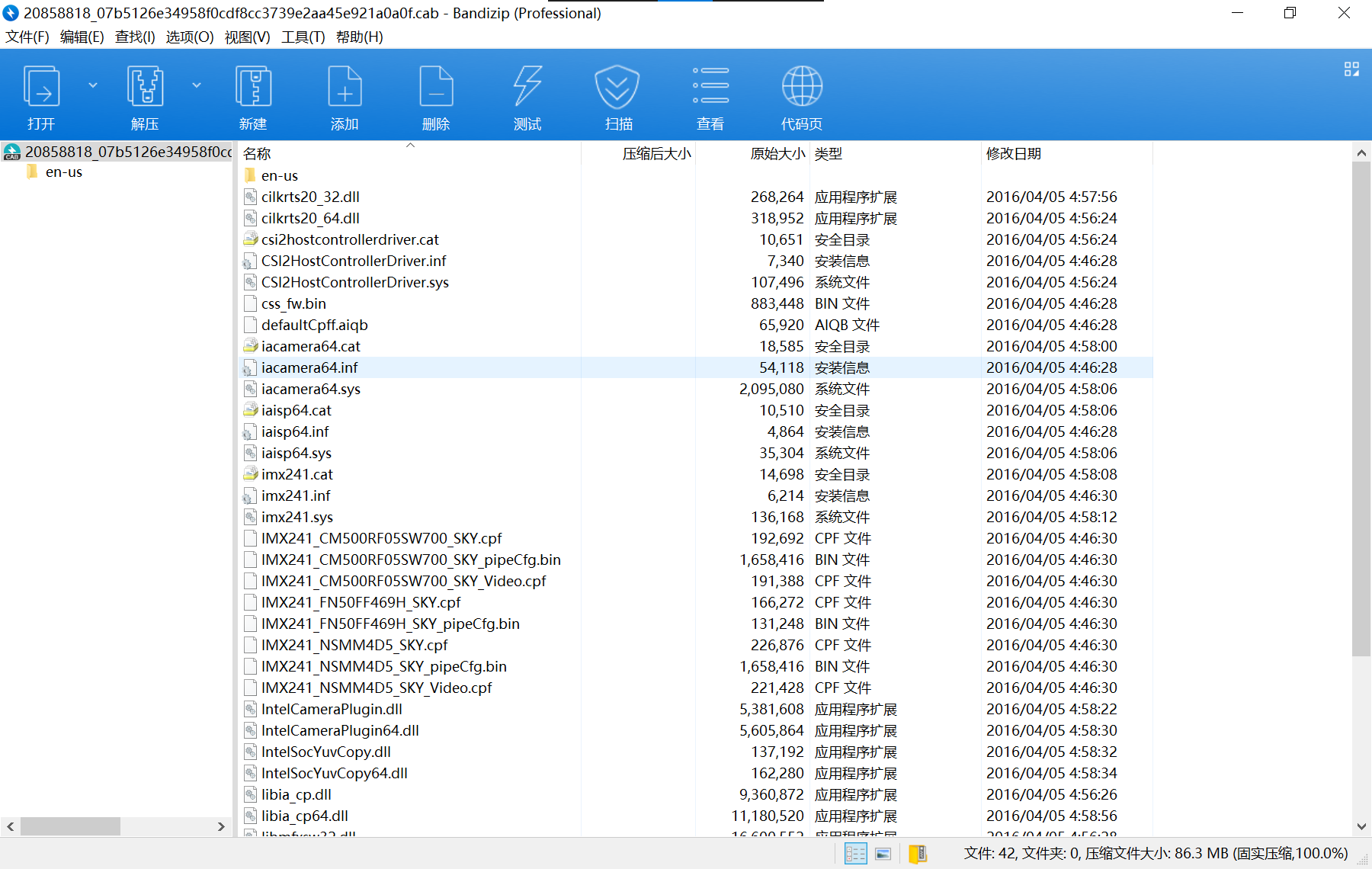
I see lots of .inf and supposedly device manager can just recognize this
Maybe Jri will not be very happy about what I’m doing that looks like a piracy party, but no, my college had bought Windows (including Server editions) and Office (including Visio, Project) for every student, literarily every student, so as long as I’m in college these copies will be genuine